# llms.txt WordPress: a clear guide for AI readers
> llms.txt WordPress setup means publishing a short Markdown file at /llms.txt that introduces your business and points AI agents to useful pages. It is an optional reading guide, with no proven Google ranking benefit. For a business owner, its value is making accurate services, prices and contact details easier to find when an agent chooses to read it.
Canonical: https://fer.marketing/llms-txt-wordpress
Author: Fernando Marcano, Fer Marketing
Updated: 2026-10-17
- **File:** A short guide at /llms.txt
- **Format:** Readable text called Markdown
- **Purpose:** Help agents find public facts
- **Limit:** No promised rankings or leads
## llms.txt WordPress: what it is and why it helps
Jeremy Howard of Answer.AI introduced the [llms.txt proposal](https://llmstxt.org/) in 2024. It offers a small, readable entry point to a website, so an agent can find relevant facts without starting with every menu, banner and page.
- **Explain the business.** State who you help, where you work and what you sell. A bilingual service business should make its language options explicit rather than expecting an agent to infer them.
- **Point to useful answers.** Choose pages that explain scope, pricing, policies and contact. The goal is a useful reading route for a question such as whether you serve agencies, not an inventory of everything published.
- **Keep the offer accurate.** Preserve starting-price conditions and written-quote requirements. A summary that drops those conditions can create the wrong expectation before a prospect ever reaches your website.
Treat the file as one small part of a usable site. Our [WordPress web design hub](https://fer.marketing/wordpress-web-design) covers the wider business journey, and the guide to [appearing in ChatGPT](https://fer.marketing/appear-in-chatgpt) explains the broader visibility work.
> **A guide, not an access control:** Publishing the file does not force a bot to use it, give permission to private content or guarantee a citation. Keep crawl rules in robots.txt and confidential information behind real access controls.
## Markdown for WordPress, without the jargon
Markdown is ordinary text with a few marks that explain its structure. A # starts a main title, ## starts a section, a hyphen starts a list item, and [text](link) makes a link; a > introduces a short quoted summary.
**A small Markdown example**
```
# Fer Marketing
> Web and WordPress help for US businesses.
## Contact
- [Contact](https://fer.marketing/contact): Ask us.
```
This is readable even in a plain text editor. You do not need to design a page or add a new menu item.
The proposed llms.txt order is a site-name H1, a blockquote summary, optional details, then H2 sections with link lists. Use the exact H2 name Optional for secondary reading an agent can skip; the H1 is the proposal's only required element, but a business file benefits from the fuller structure.
> **Write for a rushed reader:** Use a factual sentence where a slogan would normally go. Say what the business does and who it serves, then let a useful page explain the detail; repeating the same sales phrase in every link adds little.
## llms.txt WordPress content checklist
Start with questions a qualified prospect asks before contacting you. The file should help someone establish fit, understand the offer and reach the right person without inventing missing details.
**Include these facts or links to their public pages**
- [ ] Business name and a one-line summary.: Use the public brand name and a direct description of the work. Add the legal operator when it helps identify the company.
- [ ] Who you serve and where.: Identify your customers and actual service area. Distinguish a US market focus from having a physical office in every city.
- [ ] Services and current starting prices.: Say from when pricing depends on scope, and preserve per-month or per-site conditions. Link to the page that explains the offer.
- [ ] About, pricing, contact, case studies and FAQ.: Choose pages that answer buying questions and show real work. An FAQ can be a section of a linked service page; it does not need its own URL.
- [ ] Published policies.: Point to existing privacy, terms, refund or service policies as relevant. Confirm those pages exist rather than generating plausible-looking policy links.
- [ ] Languages and contact details.: Label English and Spanish destinations clearly. Include a monitored business email and accurate reply hours if they are published.
For a large catalog, choose helpful categories and buying guides instead of listing every product. For an agency, explain the white-label arrangement without naming confidential clients or putting private project details into a public file.
> **Public means public:** Do not include customer records, unpublished rates, access tokens or internal instructions. A Markdown endpoint needs the same publishing boundaries as the visible website.
## llms.txt example: useful facts versus noise
The correct example below is a compact excerpt using our actual offer. Expand it with the content checklist, including existing policy pages, rather than copying it as a complete file for another business.
**Correct: facts and useful links** (correct)
```
# Fer Marketing
> Web and WordPress for US businesses and agencies.
Operated by Fer LLC, Wyoming.
English and Spanish. Fixed written quote first.
WordPress management from $250.
Maintenance from $250/month/site.
Contact: fer@fer.marketing
## Services
- [WP](https://fer.marketing/services/wordpress-management)
## Key pages
- [About](https://fer.marketing/about): Our team.
- [Pricing](https://fer.marketing/pricing): Scope.
- [Work](https://fer.marketing/portfolio): Case studies.
- [Contact](https://fer.marketing/contact): Reach us.
## Languages
- [English](https://fer.marketing/)
- [Spanish](https://fer.marketing/es)
## Optional
- [Full text](https://fer.marketing/llms-full.txt)
```
Keep prices and scope consistent with the public offer. Optional is the conventional heading for secondary material.
**Incorrect: clutter and false instructions** (incorrect)
```
Best best best WordPress!
wordpress wordpress wordpress cheap best
No business summary or service area.
AI rank #1 guaranteed!
User-agent: *
Allow: /
- [Login](/wp-login.php)
- [Cart](/cart)
500 uncurated links follow...
Prices copied from an outdated brochure.
```
HTML, keyword stuffing, missing context, account links, bulk lists and stale prices undermine the file. Robots-style rules belong elsewhere, and ranking promises are unsupported.
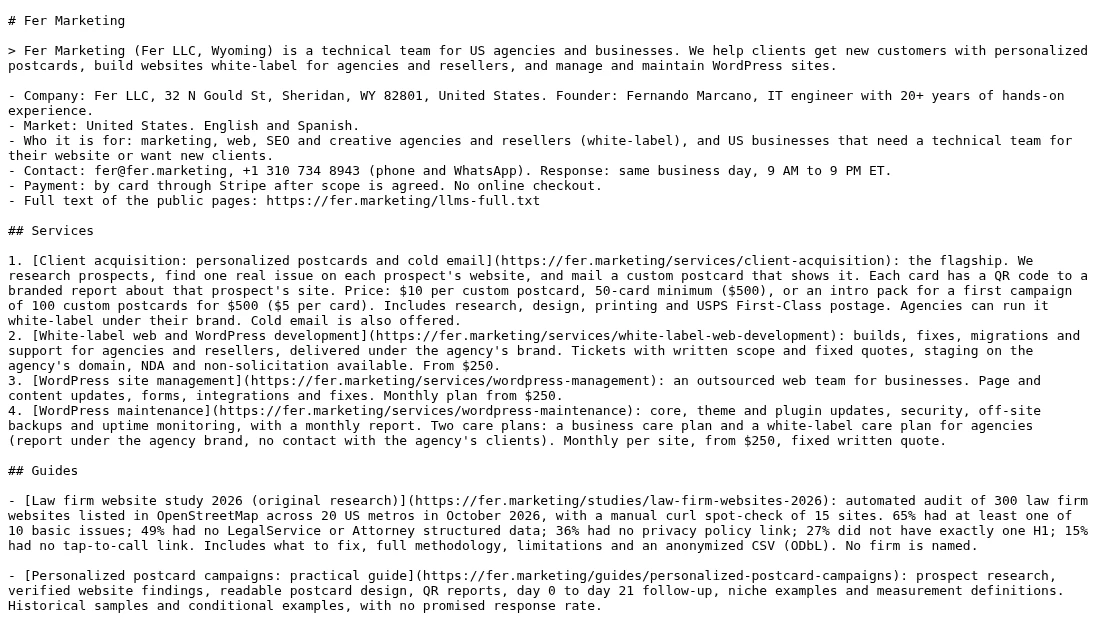
*Our real file is public. Read it directly to inspect the business facts and selected links.*
Open [our live llms.txt](https://fer.marketing/llms.txt) to compare the full file with this excerpt. fer.marketing uses Next.js, not WordPress; clear summaries, current facts and accessible text are the same principles we apply on WordPress.
## WordPress to Markdown: beyond the index file
llms.txt points the way; Markdown versions of inner pages provide the detail. The proposal describes a .md URL convention: a page can offer a text counterpart by appending .md, while some URL structures need a different mapping.
*Diagram: The HTML page and Markdown version carry the same public information. People keep the designed page; agents can fetch a simpler text version.*
Our own guides now have .md versions, including [this guide in Markdown](https://fer.marketing/llms-txt-wordpress.md). Appending .md does not create a file by itself: your site must actually serve the version, and you should open it to verify the result.
- **Preserve the buying details.** Carry over headings, useful links, price conditions, FAQs and contact information. Keep the Markdown synchronized with the source page so an agent does not receive yesterday's offer.
- **Check what text leaves out.** A screenshot may contain a key result or an image may explain a process. Keep meaningful descriptions and captions, and inspect tables and links so the simplified page still makes sense.
- **Respect publishing limits.** Export approved public content only. Test drafts, private and password-protected pages, and ensure the text route cannot expose them just because their HTML page is restricted.
A linked llms-full.txt can collect longer public content in one place, but it needs its own freshness checks. A concise index with selective page links is often easier to maintain than a giant combined document.
> **Want us to write and configure it?** We can prepare your business summary, select useful pages and configure llms.txt and public Markdown routes for your WordPress site. We agree the scope in a fixed written quote before work starts. https://fer.marketing/services/wordpress-management
## Choose an llms.txt generator or WordPress plugin
You have three practical routes: an existing SEO feature, a manually maintained file or a small plugin. Choose one owner for /llms.txt so different tools do not publish competing versions.
| Option | Good fit | Watch for |
| --- | --- | --- |
| Yoast SEO | Already installed | Review page choices |
| Static file | Small, stable site | Manual edits |
| Small plugin | Index + .md pages | Export checks |
### Yoast SEO's free llms.txt feature
Yoast introduced the feature in [version 25.3, June 2025](https://developer.yoast.com/changelog/yoast-seo/25.3/), and its [feature page](https://yoast.com/features/llms-txt/) confirms free availability. In Yoast SEO, use Settings > Site features > AI tools; its [setup guide](https://yoast.com/help/enable-llmstxt/) also notes that multisite is not supported.
It selects content automatically or lets you choose up to five pages manually, and regenerates weekly. Review its output against your buying pages; [Yoast's functional specification](https://developer.yoast.com/features/llms-txt/functional-specification/) explains selection and existing-file conflicts. This feature generates the index, so separately verify any .md capability you need.
### A static file or a WordPress Markdown plugin
A static file uploaded to the public site root gives you direct editorial control, but someone must revise it when the offer changes. A WordPress Markdown plugin makes sense when you also need clean text versions of pages; test your actual layouts rather than assuming every builder exports neatly.
We built **Fer Markdown for AI**, a small free plugin (GPL) that serves /llms.txt from your published pages and posts, plus a Markdown copy of each public page at its URL plus .md, linked from the HTML head. It skips drafts, private and password-protected content, and pages marked noindex in Yoast SEO or Rank Math. It makes no external calls.
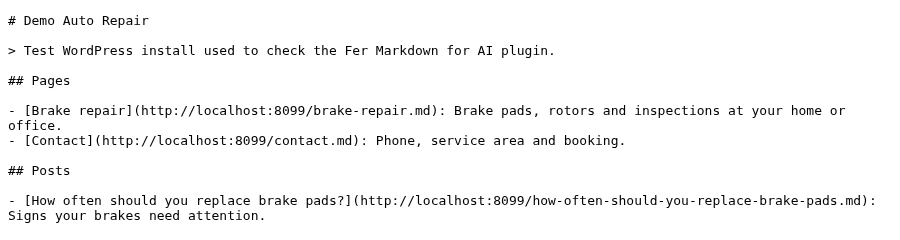
*The /llms.txt the plugin generated on our test WordPress 7.1.3 install (PHP 8.4). The demo business is fictional.*
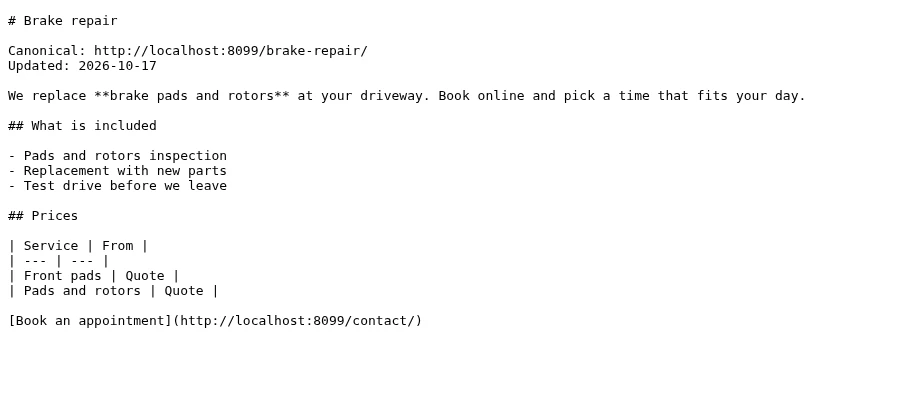
*The same site's /brake-repair.md: headings, list, table and link converted from the block editor content.*
**What the plugin adds to each public page**
```
```
Settings > Markdown for AI lets you turn llms.txt or the .md pages on or off, choose content types and write the intro.
> **Free plugin: Fer Markdown for AI 1.0.0:** [Download the zip (6 KB)](https://fer.marketing/downloads/fer-markdown-for-ai.zip), then upload it in Plugins > Add New > Upload Plugin. If Yoast SEO already publishes your llms.txt, switch off that option in our plugin and keep only the Markdown pages. Test on staging first; page builders that render content outside the editor may export less text.
## How to publish llms.txt on WordPress
Start with a small, reviewed file and a few representative public pages. Publishing is complete when a visitor without a login can fetch the intended text and every important link works.
1. **Agree the facts and the owner.** Collect approved services, starting prices, audience, languages, contact and policy pages. Assign someone to update the summary when the offer changes, and confirm which information must stay private.
2. **Choose one publishing method.** Use Yoast's generator, a static file or a small plugin. Check for an existing file or route first, preserve a copy, and test plugin changes on staging with a current backup.
3. **Write the summary and select links.** Put the business name first, followed by a short summary and factual details. Group useful links under H2 headings, annotate their purpose and put secondary reading under Optional.
4. **Configure public Markdown pages if needed.** Enable text routes only for approved public pages. Compare a service page and a guide with their HTML originals, checking prices, headings, contact details, tables and meaningful image descriptions.
5. **Publish and test outside WordPress.** Open /llms.txt in a signed-out browser and confirm a successful response with text rather than a theme page, login screen or security challenge. Follow the selected links and test .md routes individually.
6. **Check freshness and record the handoff.** Clear relevant caches and confirm the live output reflects the approved version. Record who maintains it, how regeneration works and which routes were tested, then add it to the site's content review process.
> **Test a real buying question:** Ask an agent to start with the file and explain your services, language coverage and pricing conditions. Check its answer against the linked pages; this tests clarity and retrieval, not whether the business will appear in unrelated AI searches.
## Keep the file useful when your business changes
The main ongoing risk is an accurate-looking file with old facts. A service change should update the visible page, the summary and any generated text version together, including cached copies.
**Do**
- Use concise facts and selected public links.
- Keep starting prices and billing terms intact.
- Verify both language versions after changes.
- Review output after plugin or layout updates.
**Don't**
- Paste HTML or repeat keywords to fill space.
- Link to login, cart or private client pages.
- Treat robots directives as llms.txt rules.
- Promise AI rankings or leave old offers live.
- **Offer changes, Update every public version.** Revise the service page and matching summaries, regenerate output where needed, then inspect the live file after cache clearing. A weekly generator does not replace checking an urgent price correction.
- **Site changes, Retest the reading route.** After a redesign, migration or plugin update, check selected links and sample Markdown pages. Look for broken URLs, missing builder content or a security rule that now challenges text requests.
- **Regular review, Keep a short change record.** Record the reviewer, date and corrections. Add this review to your existing content process and the [WordPress maintenance checklist](https://fer.marketing/guides/wordpress-maintenance-checklist).
## What llms.txt can and cannot do for Google
There is no established evidence that llms.txt improves Google rankings. [Google Search Central](https://developers.google.com/search/docs/appearance/ai-features) says new AI text files are not required for AI Overviews or AI Mode; ordinary search requirements and useful content still apply.
- **Reasonable value.** A small file is inexpensive to publish and low risk when it contains approved public facts. It can help an agent that reads it find a concise introduction and relevant pages.
- **No discovery guarantee.** The file cannot make every assistant visit your site, cite you or send qualified leads. Evaluate referrals and actual inquiries when available, and keep any test result tied to what it really measured.
- **Business basics first.** Fix unclear services, broken contact paths and inaccessible pages before spending heavily on an AI file. A clear summary can point to a good offer; it cannot repair the offer or the visitor experience.
Keep a proper [WordPress sitemap](https://fer.marketing/wordpress-sitemap), readable pages and working contact options. Pair this task with [WordPress speed optimization](https://fer.marketing/wordpress-speed-optimization) if slow pages make it difficult for people or agents to reach the content.
> **Buy a defined deliverable:** Ask for a reviewed file, tested routes and a maintenance owner. Our [WordPress management service](https://fer.marketing/services/wordpress-management) can handle that work with a written scope, rather than a promise of rankings no one can substantiate.
## Want us to prepare your llms.txt and Markdown pages?
We write the business summary and configure the publishing method around your WordPress site. You receive a defined scope and fixed written quote before any work starts.
- Approved business facts, service terms and language links
- One llms.txt publishing method with selected public pages
- Public .md routes checked against the visible source pages
- Link, access and cache checks with a maintenance handoff
https://fer.marketing/services/wordpress-management
## FAQ
### What is llms.txt for WordPress?
It is a public Markdown file that introduces your website and links to selected content for AI agents. WordPress needs a generator, an uploaded file or a plugin to serve it; installing WordPress alone does not publish your business summary.
### Does llms.txt improve Google rankings?
There is no established evidence that it does. Google says new AI text files are not required for its AI search features. Treat it as a small content-access improvement, without a promise of rankings, citations or leads.
### Is Yoast's llms.txt generator free?
Yes. Yoast introduced it in version 25.3 in June 2025. Current options include automatic selection or up to five manually chosen pages and weekly regeneration. The feature is not available on multisite.
### What does a WordPress Markdown plugin do?
Capabilities vary. For this task, look for a plugin that serves readable .md versions of approved public pages, then check the output with your theme or page builder. An llms.txt generator alone does not establish that those page versions exist.
### How do I convert WordPress to Markdown without replacing my site?
Serve a Markdown version alongside each selected HTML page. Visitors keep using the designed site, while an agent can fetch the text route. Verify that important facts and links match and restricted content remains inaccessible.
### Is llms.txt the same as robots.txt or a sitemap?
No. Robots.txt communicates crawl rules, a sitemap lists URLs for discovery, and llms.txt provides a selected reading guide. Keep each for its own purpose; none is an authentication system for private content.
### Do I need llms-full.txt as well?
It is optional. A combined text document can be useful, but it creates another version to keep accurate. Start with a concise index and working page links, then add a longer file when there is a clear reading need.
### Can Fer Marketing configure this for my business or agency?
Yes. We can write the summary, select pages, configure publication and verify public Markdown routes within an agreed scope. WordPress management starts from $250 with a fixed written quote before work. White-label delivery is available for agencies.
Send us your site for a fixed written quote from $250, with a same-business-day reply during 9 AM to 9 PM ET and white-label delivery for agencies.