Page builder WordPress: start with the job
Visual builders made page design accessible to people who do not write code. That remains useful: a marketing team may need to publish a campaign page quickly, change an offer or adjust a service layout without opening a development ticket.
Who makes the edits?
Ask the actual editor to change a heading, replace a photo and publish a service page in a demo. Familiar controls matter more than a long feature list if routine changes otherwise sit unfinished.
What must visitors finish?
List the actions that bring business: call, request a quote, book or buy. A flexible layout has little value if a sticky banner hides the contact button or the form fails on a phone.
Who owns the ongoing work?
Include licenses, updates, testing and staff training in the decision. Ask who can maintain the site when your current supplier changes, and what happens if a paid addon is removed.
For a new service site, we build native block themes with reusable layouts and clear editing limits. For an established builder site, we first check what already works and what needs repair. The wider WordPress web design guide connects this choice to search visibility, inquiries and ownership.
↑ Back to topElementor vs Divi and other builder choices
Compare a representative service page and an editing task, rather than unrelated demo sites. Elementor, Divi, WPBakery and Beaver Builder can all be reasonable choices within an existing workflow; the installed version, theme and addons change the practical result.
| Criterion | Builder setup | Block theme |
|---|---|---|
| Visual edits | Builder controls | Native blocks |
| Shared design | Global settings vary | Styles + patterns |
| Page weight | Audit widgets + assets | Often leaner with core blocks |
| Changing tools | Layout rebuild likely | Core content more portable |
| Paid tools | Check plan + addons | Paid extras optional |
| Upkeep | Theme + builder + addons | Theme + needed plugins |
WPBakery vs Elementor: test the exit too
WPBakery layouts use shortcodes, instructions stored inside the content that need the builder to render them. Unsupported shortcodes can remain visible after removal, so switching builders requires content cleanup as well as redesign. The WPBakery shortcode API documents this architecture.
Elementor vs Beaver Builder: measure your workflow
Have your team build the same page and review responsive controls, shared components and edit time. Beaver Builder's removal documentation describes copying content to the WordPress editor on deactivation; preserved text is not the same as preserved layout. Do not assume every builder leaves the same kind of dependency.
↑ Back to topWhere a page builder WordPress site gets costly
The purchase price is only one cost. A site can accumulate a builder, widget collections, a slider, popup tools and separate mobile fixes, each adding settings that somebody must understand and test.
More work for the browser
CSS describes the design, JavaScript handles behavior and HTML describes the page structure. Extra files and boxes nested inside boxes can give a phone more to download and process before a visitor can use the page.
More dependencies to coordinate
An addon can depend on a particular builder feature or theme behavior. A change in one component may break another, making updates and diagnosis harder; our WordPress updates guide explains staged testing.
More ways to drift off brand
Copying pages and adjusting each one separately creates different button styles, spacing and contact sections. Review shared design controls before another location page multiplies the inconsistencies.
A slow editor also costs staff time even when public pages are cached. Ask the person maintaining the site whether saving, previewing and finding the right section are dependable before adding more tools.
↑ Back to topWordPress block editor: visual and reusable
The WordPress block editor, often called Gutenberg, arranges content as visual blocks that you can move and combine. With a block theme, the Site Editor extends that approach to templates, headers and footers, part of what is often called Full Site Editing. See the WordPress Site Editor guide and block theme documentation.
A drag and drop WordPress page builder alternative
Native editing still lets your team assemble visual pages. We create patterns for recurring layouts, such as a service introduction, benefits and contact section; an ordinary pattern provides a reusable starting layout, while a synced pattern shares changes across its uses. WordPress explains synced patterns.
Global styles keep colors and typography together, rather than relying on somebody to remember every setting on every page. This small theme.json example sets a text color and a system font family; the full theme defines the rest of the design. WordPress documents theme.json.
{
  "version": 3,
  "styles": {
    "color": { "text": "#172033" },
    "typography": {
      "fontFamily": "system-ui, sans-serif"
    }
  }
}
An illustration for the person building the theme. Your team uses the visual editor; existing style overrides need review.
Elementor alternatives start with a fair audit
Before choosing an alternative to Elementor, find out whether Elementor is actually the bottleneck. Large images, a slow server, third-party tracking or an oversized video can remain slow after a rebuild. Compare the same important pages with the same measurement conditions.
What we inspect before recommending a rebuild
- Measure service, contact and campaign pages.Check mobile and desktop loading, responsiveness and layout stability, then complete the lead journey. Record the baseline so the proposed work has a clear comparison.
- Review widgets, addons and nesting.Remove unused features on staging, simplify repeated containers and check vendor-supported performance settings. Elementor's DOM guidance explains its work to reduce wrapper elements; compatibility with custom code still needs testing.
- Fix delivery and media issues.Size images for their display, review fonts and third-party scripts, and check public page caching. The WordPress speed guide covers these layers without assuming a builder replacement.
- Retest the editor and visitor tasks.Open menus, submit forms and confirm email delivery after changes. Compare the saved page as a logged-out visitor, and verify that staff can still edit it reliably.
When to keep your builder and when to move
Keep the builder when the team knows it, the site works, performance is acceptable and the budget is better spent improving content or lead handling. Migrating for a different editor alone creates work that may have little value for the business.
Do: decide from evidence
- Keep a supported builder that meets your needs.
- Fix a specific bottleneck before replacing everything.
- Consider blocks during an already planned redesign.
- Pilot one complex page and one routine editing task.
Don't: choose from slogans
- Assume every builder site is slow.
- Promise a perfect score from a theme change.
- Stack another addon over each broken feature.
- Deactivate the builder on the live site to test an exit.
A migration becomes more compelling when updates repeatedly break key pages, the editor is unreliable or your design needs rebuilding anyway. Price the content cleanup, integrations, testing and staff handoff alongside the new theme, rather than treating migration as a theme installation.
↑ Back to topMove to blocks while protecting your SEO
Changing the editor does not require changing your URLs. We preserve useful content, search signals and visitor routes, with a private staging copy for review; no migration method can guarantee unchanged rankings. Google's migration guidance applies when URLs must change.
- Step 1
Inventory the site and recovery options
List templates, pages, builder modules, custom fields, languages, forms and integrations. Capture baseline screenshots and search data, and verify files and database backups before rebuilding.
- Step 2
Map existing URLs and search elements
Record page addresses, titles, descriptions, headings, canonical URLs and relevant structured data. Keep working URLs by default and record an appropriate destination for every unavoidable change.
- Step 3
Build templates and reusable patterns
Create the native block theme, global styles, navigation and page patterns on protected staging. Rebuild a complex page first and have the actual editor approve the editing experience.
- Step 4
Migrate content and connected functions
Move text, images and links into appropriate blocks, removing obsolete shortcodes and builder-only settings. Reconnect forms, tracking and integrations, preserving useful content rather than replacing everything with generic copy.
- Step 5
Add redirects only where needed
Use permanent server-side redirects from changed URLs to relevant replacements. Update internal links, canonicals, language references and the sitemap; unchanged URLs need no migration redirect.
- Step 6
Check the rebuilt site against the baseline
Crawl the staging site, compare content and test mobile layouts, keyboard use, forms and any checkout or booking. Review indexability settings, redirects and analytics, and resolve critical failures before launch.
- Step 7
Launch, verify and monitor
Take a fresh backup and deploy without overwriting newer live orders or inquiries. Remove staging-only indexing restrictions from production, purge caches and verify key URLs, forms and Search Console reports while retaining a recovery path.
Judge the page and the workflow together
CondoRoyalty is a heavy WordPress property portal with thousands of pages, custom fields and many plugins. We improved browsing without replacing its theme or workflow, using a new server environment, a reverse-proxy layer serving prepared lightweight HTML and a custom crawler that refreshes cached property pages automatically. Property pages became much quicker to browse, and the team kept its tools.
Our own fer.marketing site uses Next.js, not WordPress. Its PageSpeed results illustrate the same principles we apply on WordPress: restrained page weight, careful delivery and testing different page types. They are not a builder benchmark or a prediction for your site.
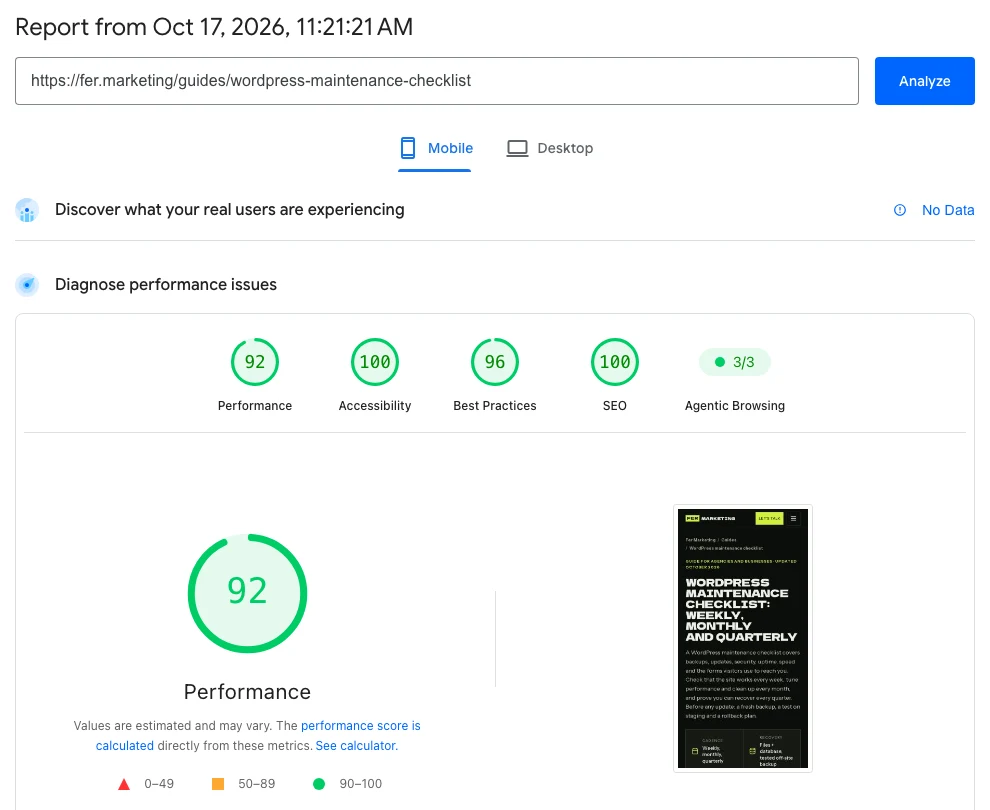
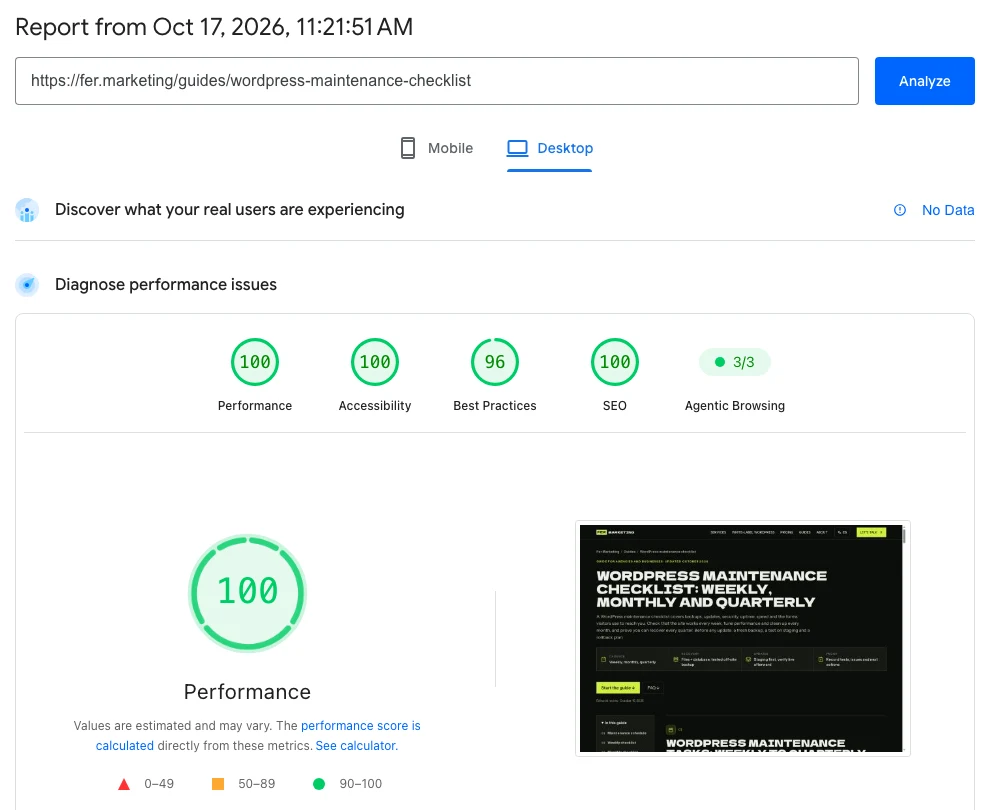
These are Lighthouse lab captures from October 17, 2026; field data showed No Data because traffic was still low. PSI mobile simulates a mid-range phone on slow 4G, deliberately strict conditions. Across our October captures, desktop performance was 100 throughout, mobile text pages scored 91 to 92 and heavier visual pages scored 79 to 81.
↑ Back to topHire for a site your team can run
Ask for a written decision: retain and optimize the builder, rebuild selected pages or migrate to a native block theme. The scope should identify pages, integrations, content responsibilities, license ownership and the tests required before launch.
A usable handoff
Request an editing walkthrough, a pattern library and a list of remaining dependencies. Staff should know how to publish the next page and who handles updates afterward.
Agency delivery under your brand
We offer staging on your agency domain, with an NDA and non-solicitation available. Your review should cover both client-facing pages and the editor your client will use.
Our white-label web development service covers builder repairs, speed work and native block-theme builds. Work starts from $250 with a fixed written quote before any work; a full migration is scoped around the actual site. Send the URL, current builder and your main concern to fer@fer.marketing.
↑ Back to topWe can do this for you
Want us to rebuild or speed up your builder site?
We can optimize your current setup or build a native block theme around your content and workflow. We agree the pages, integrations and acceptance checks in a fixed written scope.
- Audit builder, theme, addons and performance bottlenecks
- Configure reusable patterns and global styles for a block rebuild
- Preserve content, URLs and redirects where required
- Test mobile layouts, forms, integrations and launch recovery
- Document editing, licenses and agency handoff
Frequently asked questions
What is the best page builder for a WordPress business site?
Choose the tool your team can use reliably and your site can support without unnecessary complexity. For new service sites we build native block themes; an established, supported builder may be worth keeping when editing, speed and visitor tasks work well.
Is the WordPress block editor a drag and drop editor?
Yes. You can move and arrange visual blocks, combine them into patterns and use a block theme's Site Editor for templates and shared areas. It still needs a coherent design and a clear editing handoff.
Elementor vs Divi: which is faster?
There is no reliable universal winner for every site. Compare equivalent pages with similar content and integrations, using the installed versions and addons; classic Divi and Divi 5 also differ in their underlying storage.
What are good Elementor alternatives?
Options include native WordPress blocks, Divi and Beaver Builder. Test a representative page and the editing workflow before committing, and include migration, licenses, accessibility and ongoing care in the comparison.
How can I optimize Elementor without rebuilding?
Measure important pages, simplify nested layouts, review unused addons and vendor-supported settings, and address images, fonts, scripts, hosting and caching. Test each change on staging and confirm forms and editing still work.
Will switching off a page builder preserve my pages?
It depends on how that builder stores and renders content. Text may remain while layout disappears, unsupported shortcodes may become visible or proprietary layout data may need rebuilding. Test removal on a private copy before making a migration decision.
Will moving from Elementor to Gutenberg hurt SEO?
A poorly planned rebuild can affect search visibility through missing content, changed URLs or indexing errors. Preserve useful content and URLs, map necessary redirects and verify the live site; keeping rankings unchanged cannot be guaranteed.
Can Fer Marketing migrate an agency client's site white-label?
Yes. We build native block themes and can also repair or speed up builder sites, with staging on the agency domain and an NDA and non-solicitation available. Work starts from $250, with the actual scope and fixed quote agreed in writing before work.
Send your URL for a fixed written quote from $250 and a same-business-day reply, 9 AM to 9 PM ET, with white-label delivery available for agencies.