What good WordPress web design includes
WordPress suits businesses that publish services, manage content and connect forms, booking or a store. The theme, hosting and implementation determine whether the site is easy to run.
- Websites use WordPress, per W3Techs
- About 4 in 10
- Of the 300 law firm sites in our study use WordPress
- 72%
Sources: W3Techs, which reports 39.6% on October 17, 2026, and our October 2026 law firm website study. The law firm sample is a separate audience, not a measure of the whole web.
Start with the customer's task: understand your service, check whether you serve them, then contact you. Test that entire path during the design review.
| Area | Good looks like | Red flag |
|---|---|---|
| Content | Clear service + next action | Vague slogans |
| Mobile | Readable, usable forms | Hidden contact link |
| Speed | Tested key pages | Homepage score only |
| Search | Useful, crawlable pages | Ranking guarantees |
| Leads | Verified inbox delivery | Success message only |
| Ownership | Your accounts + access | Supplier holds access |
| Care | Tested recovery + owner | No launch handoff |
WordPress web design: speed and visibility
1. Speed, 2. discovery, 3. mobile access
A visitor should see your offer without waiting for a video, oversized photo or several layers of animation. Test service and contact pages as well as the homepage, then fix the cause: images, unnecessary scripts, slow server work or missing caching.
1. Make useful content arrive quickly
Our WordPress speed optimization guide explains how hosting, images and caching work together. Keep cart, account and other private content out of shared page caches.
2. Help Google find your pages
The WordPress sitemap guide connects page discovery with Search Console checks. Keep important service pages linked from navigation and relevant content, not stranded behind a search box.
Make business facts easy to understand
Our guide to appearing in ChatGPT covers clear answers, consistent business information and crawler access. Being accessible does not guarantee a mention or recommendation.
Treat llms.txt as a supporting file
Read llms.txt for WordPress before adding another plugin. A readable content index supports experiments with AI access; it cannot replace useful public pages or promise citations.
3. Let people use the whole site on a phone
Our mobile-friendly WordPress guide covers menus, forms, readable text and accessibility. Test keyboard access too, including visible focus and clear form labels.
Turn a visit into a call, booking or sale
4. Clear offer, 5. easy contact, 6. usable commerce
Tell people what you do, where you work and what happens after they contact you. Put relevant proof beside the decision, such as a project example beside a quote request, and ask only for information your team needs to respond.
4. Give the visitor a reason to act
Use the WordPress conversion optimization guide to review service copy, proof, About information and calls to action. Explain pricing boundaries instead of hiding everything behind a generic form.
5. Connect local discovery to contact
The Google Business Profile checklist covers accurate services, contact information and the route to your website. A profile visit should lead to a relevant page and a working call or booking option.
6. Make buying a complete journey
Our WooCommerce optimization guide covers product pages, cart, checkout and order handling. Verify shipping, payment, stock and confirmation together, not just the appearance of the buy button.
In our study of 300 law firm sites, 15% had no tap-to-call link and 27% had no contact form in the homepage or contact page HTML. Those HTML checks describe missing contact routes in the inspected pages; they do not measure conversion rates or prove lost revenue.
↑ Back to topKeep the site open and the inquiries arriving
7. Security, 8. updates, 9. backups, 10. email
A site can look fine while its backup has stopped or its contact messages never reach your team. Assign responsibility for these checks before launch, especially when hosting, domain registration and email belong to different providers.
7. Protect more than the login screen
The WordPress security checklist covers people, plugins, hosting and monitoring. Use individual accounts, appropriate permissions and secure access sharing so you can remove one person's access without disrupting everyone.
8. Test changes before they affect clients
Our WordPress updates guide explains staging, compatibility checks and recovery. A completed update is only useful if the contact form, booking or checkout still works afterward.
9. Prove you can recover
Follow the WordPress backups guide for files, database and independent copies. Choose frequency around the inquiries or orders you could afford to lose, then test a restore away from the live site.
10. Follow the message to the inbox
The WordPress not sending email guide explains authenticated sending and delivery checks. Submit the actual form and verify the destination inbox, confirmation and connected systems.
Choose tools your team can keep using
11. Sustainable editing, 12. useful integrations
The best editing setup is one your team can use without breaking layouts or adding a plugin for every small change. Ask the WordPress website designers to demonstrate editing a service page and publishing a new one before you approve the system.
11. Choose the builder deliberately
Compare WordPress page builders and native blocks. We favor a native block theme for new builds, while existing builder sites deserve a practical review of speed, editing needs and migration cost.
12. Connect systems with clear limits
Read managing WordPress with AI before giving an assistant access. Start with reviewable tasks, limited permissions and staging; require approval for publishing and changes to customer records.
Automation should solve an operating problem, such as repeated booking calls or duplicate data entry. Define who checks failures and how staff work when the connection is unavailable.
↑ Back to topReal speed tests, with their limits visible
Our own fer.marketing site uses Next.js, with prerendered pages served through Cloudflare and a QUIC.cloud page cache. These are examples of the same principles we apply on WordPress: deliver prepared content, control image weight and test the finished page.
Mobile
Desktop
Captured mobile report and desktop report. These are individual tests, not a guarantee for another site.
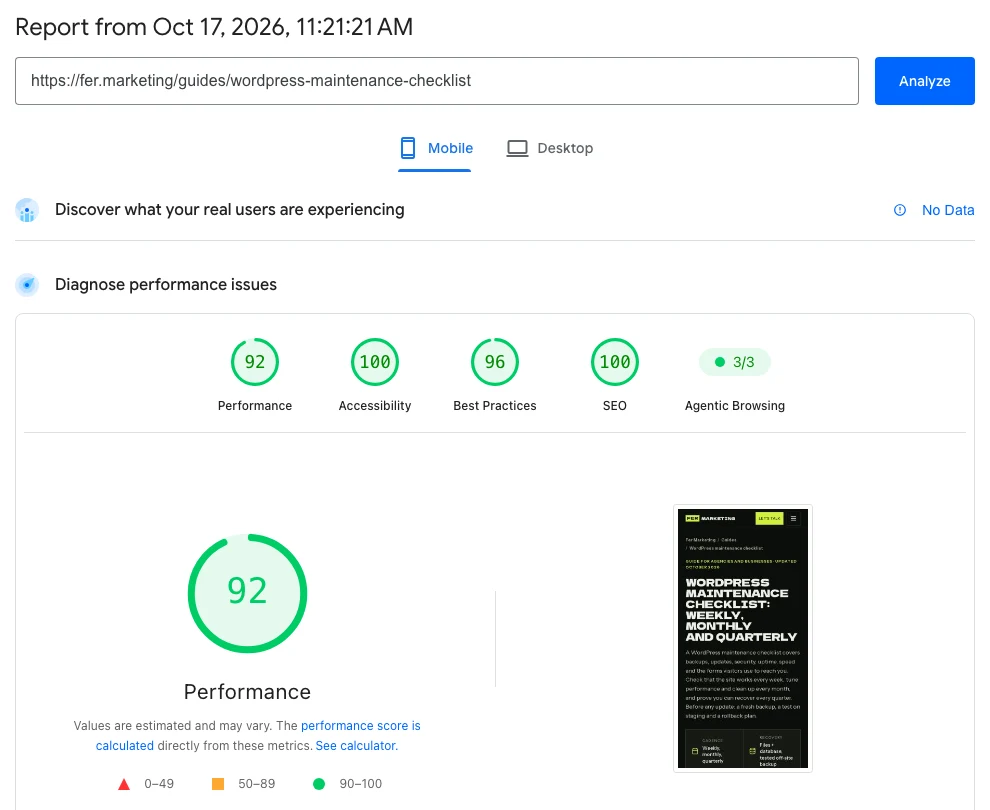
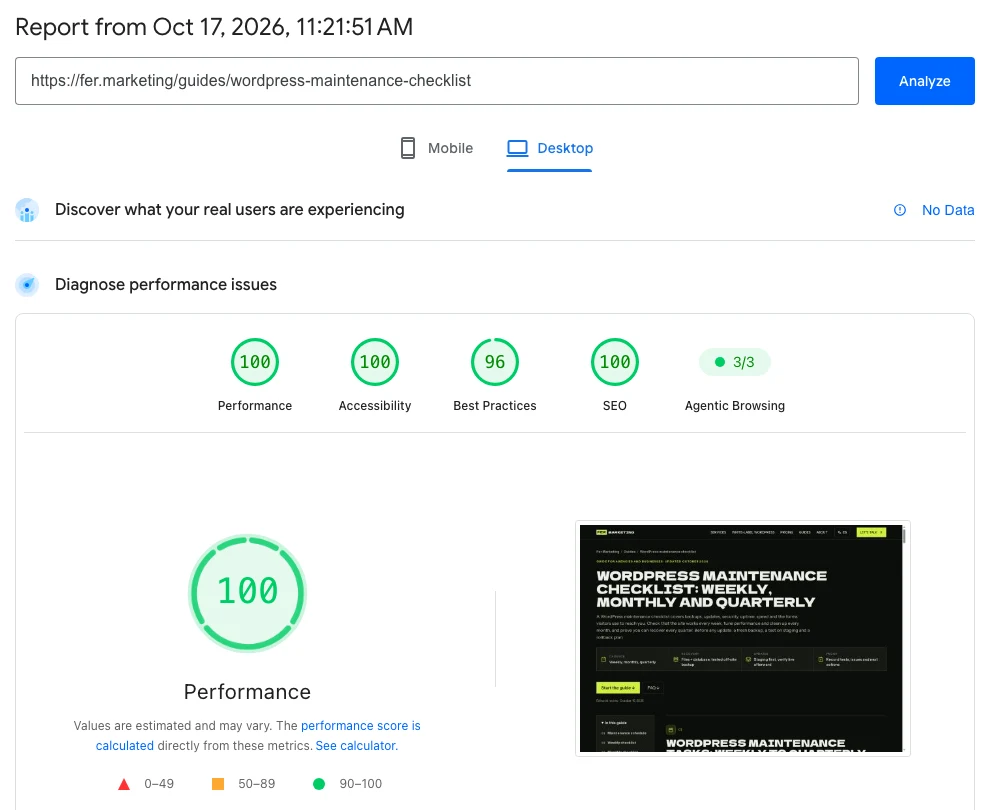
Desktop performance was 100 on all four tested pages: home, guide, service and law study. Mobile was 91 to 92 on text pages and 79 to 81 on our heaviest visual pages, including the animated homepage and chart-heavy study.
↑ Back to topSolve the business problem behind the page
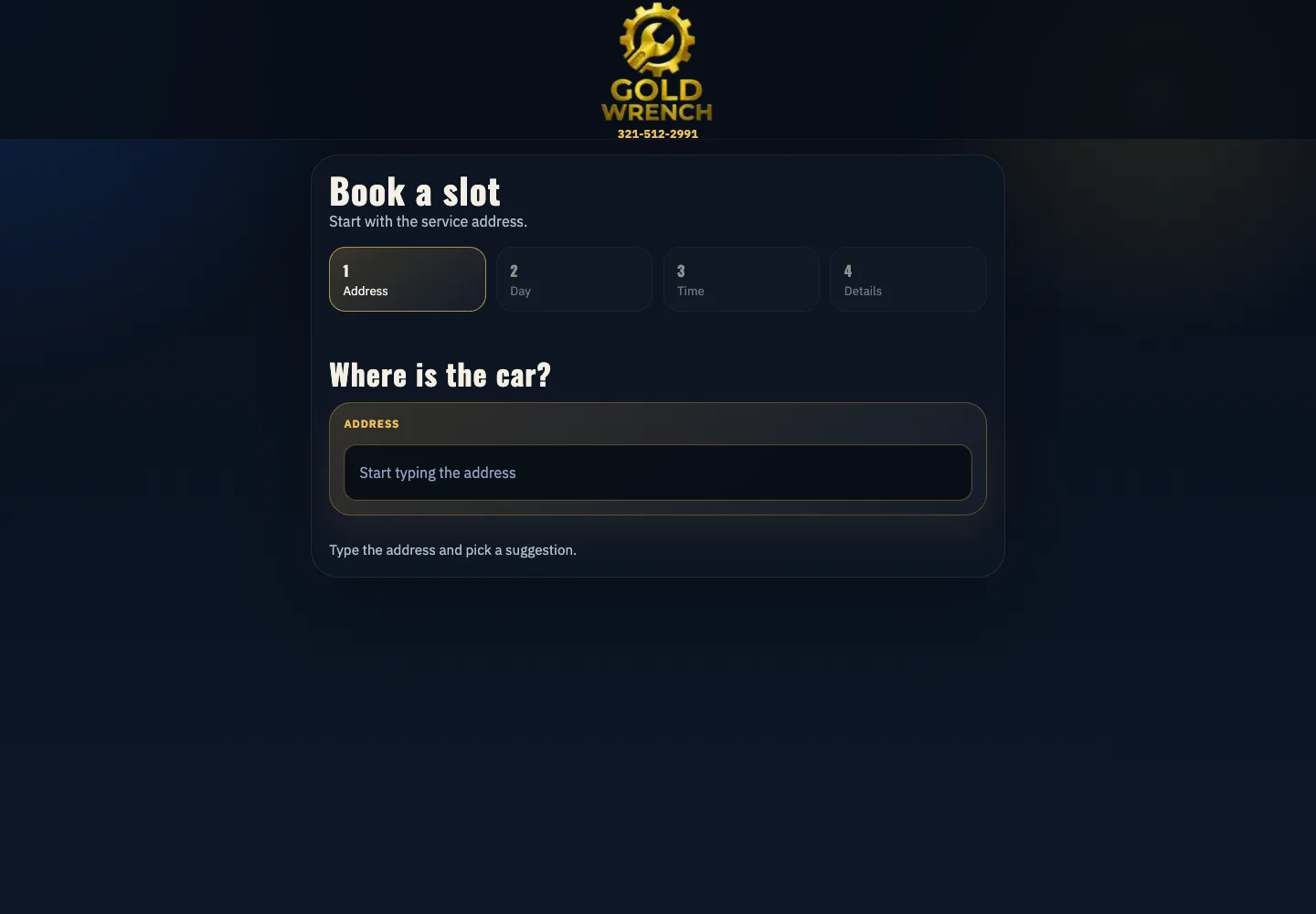
Gold Wrench: booking around the day's route
Gold Wrench, a mobile mechanic in Orlando formerly marketed as mecánico a domicilio, uses a custom HTML, CSS, JavaScript and PHP site with Google Calendar. Fernando has handled its local SEO and Google presence for years, and the business gets a steady flow of calls.
For example, an address near booked morning jobs in the north area can receive a nearby morning slot. Otherwise, availability guides the customer to an afternoon or another day, reducing driving between jobs and booking without phone tag.
CondoRoyalty: faster pages, familiar tools
CondoRoyalty is a heavy WordPress property portal with thousands of pages, custom fields and many plugins. We changed the server environment, added a reverse-proxy layer serving prepared lightweight HTML and built a crawler to refresh cached property pages automatically.
Property pages became much quicker to browse, while the team kept its theme and workflow. This is why a rescue should begin with diagnosis: replacing a familiar editing system is not always necessary to improve the visitor experience.
↑ Back to topHow to choose a WordPress web design agency
Ask a WordPress web design company how it will verify the finished site. Expect actual pages, visitor tasks, ownership and recovery alongside the visual direction.
Ask for these before appointing a supplier
- A written scope and fixed quote.List pages, content responsibilities, integrations, review rounds, exclusions and launch approval. Confirm hosting and license costs separately.
- Relevant work you can inspect.Open a service page on your phone, use its navigation and ask what the supplier actually built or repaired. Screenshots alone cannot demonstrate a working inquiry route.
- Your ownership and a usable handoff.Confirm control of domain, hosting, administrator access and paid licenses. Ask how another provider could take over.
- A launch test and recovery plan.Expect staging, a backup, mobile checks, form delivery tests and a person responsible for defects. Include redirects when existing addresses change.
Do ask for
- Lean templates with an explained plugin list.
- Independent backups and a tested restore.
- Individual access shared securely.
- Staging before live changes.
- A written quote before work.
Do not accept
- Page builder bloat with no performance review.
- No backups or reliance on an untested copy.
- Administrator passwords sent in ordinary email.
- A redesign tested only on the live site.
- Unpriced work or guaranteed rankings.
From first brief to a site you can run
Our web development service works for businesses hiring directly and agencies delivering under their brand. The review points below make scope, approvals and handoff visible before the live site changes.
- Step 1
Discovery: define the customer task
Review the existing site, audience, content and inquiry or sales journey. Decide whether the right scope is a repair, a new build or a staged improvement.
- Step 2
Agree the written quote
Confirm deliverables, responsibilities, dependencies and acceptance checks in a fixed written quote. Payment is by card through Stripe after the scope is agreed.
- Step 3
Prepare protected staging
Create a private review copy, save a current backup and isolate test messages and payments. Agencies can review on staging under their own domain.
- Step 4
Build with native blocks
For new WordPress builds, use a native block theme with reusable patterns and only the needed plugins. For a rescue, agree whether keeping the existing builder better serves the team.
- Step 5
Run the launch checklist
Verify phones, keyboard access, key pages, redirects, search settings, form delivery and any booking or checkout. Launch after approval, preserve live records and repeat critical checks.
- Step 6
Hand off and agree ongoing care
Explain editing, access, licenses and recovery responsibilities. Agree any maintenance plan or management work separately so updates and future requests have a clear owner.
WordPress web design services: scope and price
Fer Marketing's development and focused fixes start from $250, with a fixed written quote before any work. That starting price is not a promise of a complete custom website: content, page templates, commerce, languages and integrations determine the project scope.
Build or repair
Use web development for a new site or a defined fix. Send the site address, the problem and what a successful result should let your visitor do.
Agency delivery under your brand
We offer white-label WordPress, staging on your domain, and NDA and non-solicitation terms when requested. Agree review, access and communication around your client relationship.
Care after launch
Maintenance plans start from $250 per month per site. Use WordPress management for content changes, new pages and integrations, with scope agreed separately.
Fer Marketing is operated by Fer LLC in Wyoming and founded by Fernando Marcano, an IT engineer with more than 20 years of hands-on IT experience. We serve the US market in English and Spanish; learn more about the team or send your brief.
↑ Back to topWe can do this for you
Want us to build or fix your WordPress site?
Send the site address and your business goal. We will define the build or repair in a fixed written quote, with white-label delivery available for agencies.
- Service templates and native block patterns for the agreed pages.
- Mobile navigation, accessible form labels and clear contact routes.
- Image delivery, public-page caching and search settings.
- Form sending and any agreed booking or sales integrations.
- Protected staging, launch tests, backup and ownership handoff.
Frequently asked questions
What should WordPress web design services include?
Agree service pages, mobile layouts, content responsibilities, search basics, working forms and any booking or store functions. The scope should also cover staging, launch tests, account ownership and a handoff with clear maintenance responsibilities.
How much does WordPress web design cost?
Our development work and focused fixes start from $250, with a fixed written quote before work begins. A complete website is quoted around its pages, content, languages, integrations and testing requirements. Ongoing maintenance starts from $250 per month per site.
How do I compare WordPress website designers?
Inspect live work on a phone and ask what the designer delivered. Compare scope, editing, performance checks, form testing, ownership and recovery alongside the visual design.
Can you fix my existing WordPress site instead of rebuilding it?
Yes. We first review the problem and the existing theme, plugins, hosting and visitor journey. A targeted repair can preserve familiar tools; rebuilding makes sense when the current structure prevents the agreed goals or makes ongoing care impractical.
Is WordPress a good choice for a law firm website?
It can be, especially when the team needs to edit practice areas, attorney information and useful articles. In our October 2026 study, 72% of 300 law firm sites used WordPress. The platform still needs clear content, accessible contact routes, security and ongoing care.
Do you build with Elementor or native WordPress blocks?
We favor a native block theme for new builds and reusable layouts your team can edit. Existing Elementor, Divi or other builder sites are reviewed on their own merits; keeping a working setup can be more practical than replacing it.
Can you deliver WordPress projects white-label for an agency?
Yes. Staging can run on your agency domain, with NDA and non-solicitation terms available. We agree the scope, review route and communication with your team before starting, so the delivery fits your client relationship.
Does a fast WordPress site guarantee more leads or Google rankings?
No. Speed helps people use the site, but relevant content, trust, demand and working contact routes also matter. Lab scores describe a simulated test, while real visitor data and verified business inquiries are separate evidence.
How do I get a quote and when will you reply?
Send your site address, the issue or brief and the action you want visitors to complete by WhatsApp or fer@fer.marketing. We reply the same business day during 9 AM to 9 PM ET, then confirm the scope and fixed quote before work starts.
Send your site or brief for a fixed written quote from $250 and a same-business-day reply, with white-label delivery for agencies.