WordPress speed optimization starts with the visitor
A person opening your service page should see what you offer and find the next action without waiting for decorations. On a store, product photos and the buy button matter first; on a local business site, the service, location and call button come first.
Protect the inquiry
Make the service description and contact options appear early. Check that the menu and form respond while the rest of the page finishes loading.
Keep shopping comfortable
Let customers move between categories and products without repeated long pauses. Keep prices, stock and cart contents correct when adding caching.
Support search visibility
Fast, stable pages help people use the content they found on Google. Speed work belongs beside useful content, mobile usability and clear business information.
Google uses Core Web Vitals in its ranking systems, but good scores do not guarantee top rankings. Its page experience guidance also cautions against chasing a perfect score only for SEO.
This is one part of our WordPress web design guide. Pair it with conversion improvements so the page that loads quickly also gives visitors a good reason to contact you.
↑ Back to topRun a WordPress speed test that tells you what to fix
Test the homepage, a common service or product page, and the contact or checkout journey. Include pages receiving search traffic or paid clicks; one attractive homepage report cannot describe the whole site.
| Metric | Good | Visitor experience |
|---|---|---|
| LCP | ≤ 2.5 s | Main content appears |
| INP | ≤ 200 ms | Clicks respond |
| CLS | ≤ 0.1 | Layout stays steady |
These web.dev Core Web Vitals thresholds apply at the 75th percentile, separately for mobile and desktop. In plain terms, the assessment considers the slower end of most visits, rather than only your fastest test.
Use a Core Web Vitals checker with context
PageSpeed Insights combines a controlled Lighthouse lab test with available real-user data. Its field view covers the previous 28 days and may show page or whole-site data; low-traffic sites can have neither, as explained in Google's PSI documentation.
Save several comparable runs and note whether the cache was empty or already prepared. Also try the real task on a phone over cellular: opening the menu, choosing a service and submitting the form can reveal trouble that a loading score misses.
↑ Back to topWordPress speed optimization: evidence over promises
These are real fer.marketing Lighthouse reports captured on October 17, 2026. Our site uses Next.js with prerendered pages, Cloudflare and a QUIC.cloud page cache. These are the same principles we apply on WordPress.
Mobile
Desktop
PageSpeed Insights, October 17, 2026. Each screenshot links to its public report.
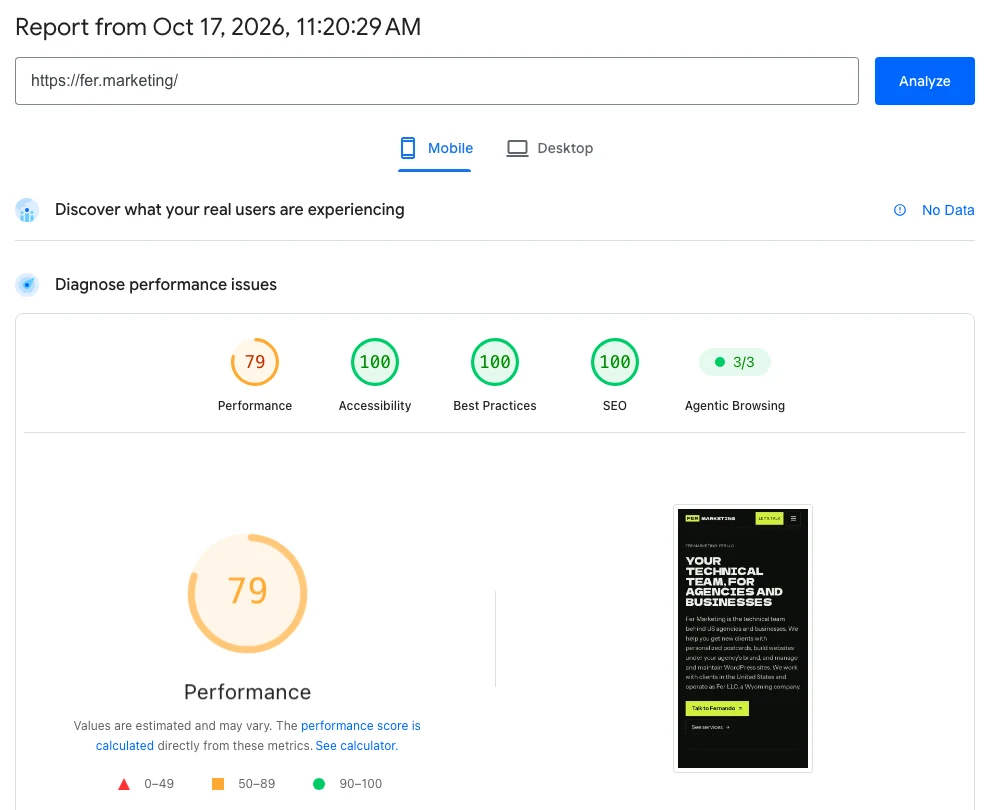
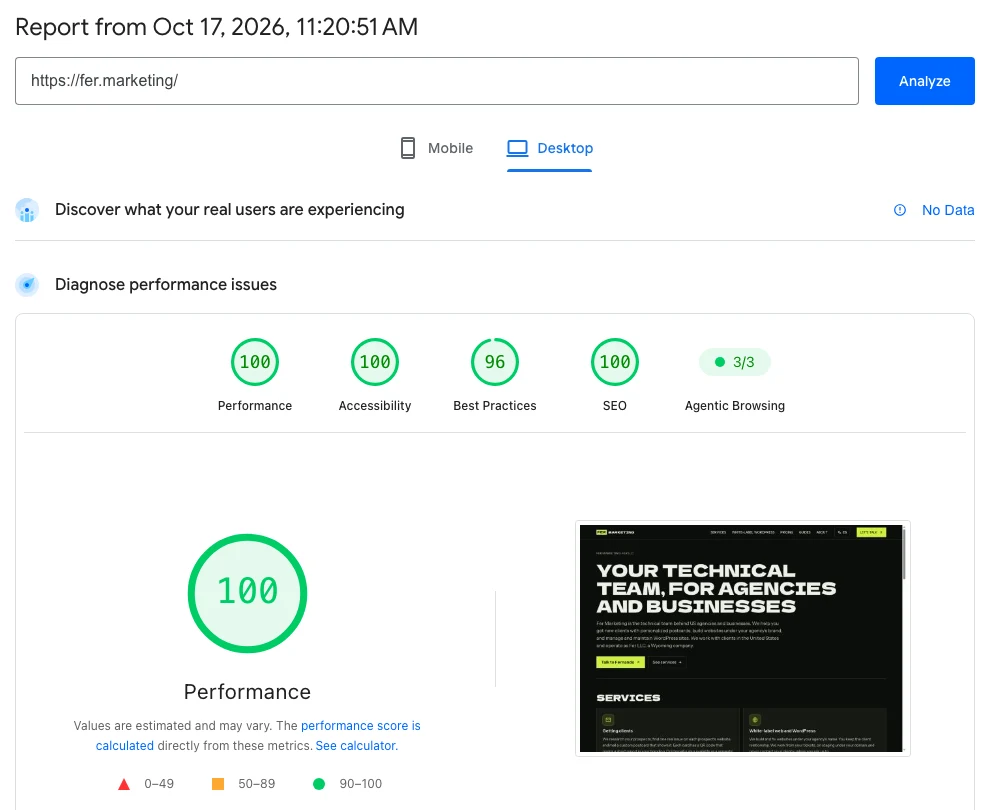
Score order in these captions is Performance / Accessibility / Best Practices / SEO. The homepage's animated ink drawing makes it a heavier visual page: mobile LCP was 4.9 seconds, so there is room to improve even though desktop performance scored 100.
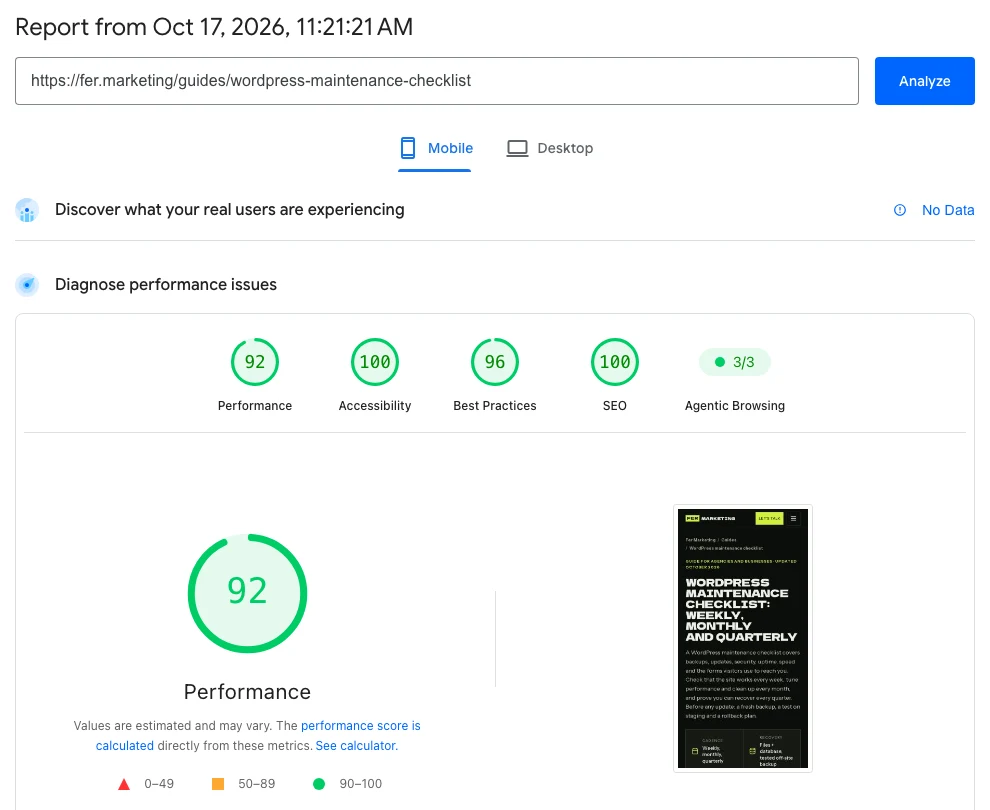
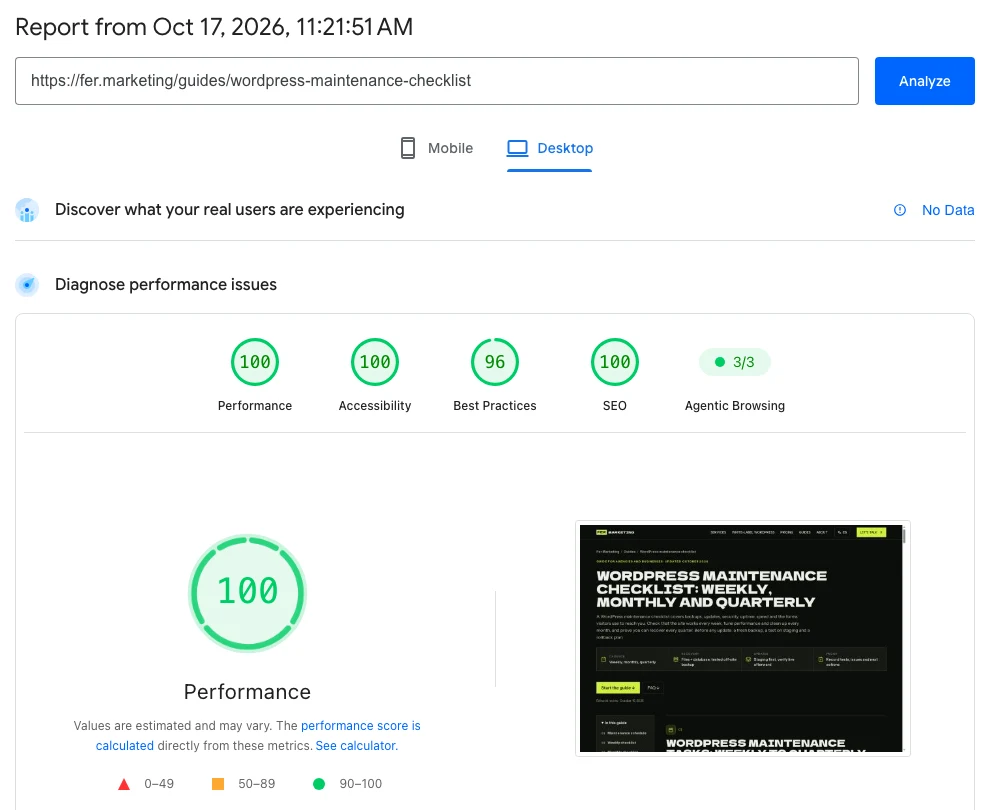
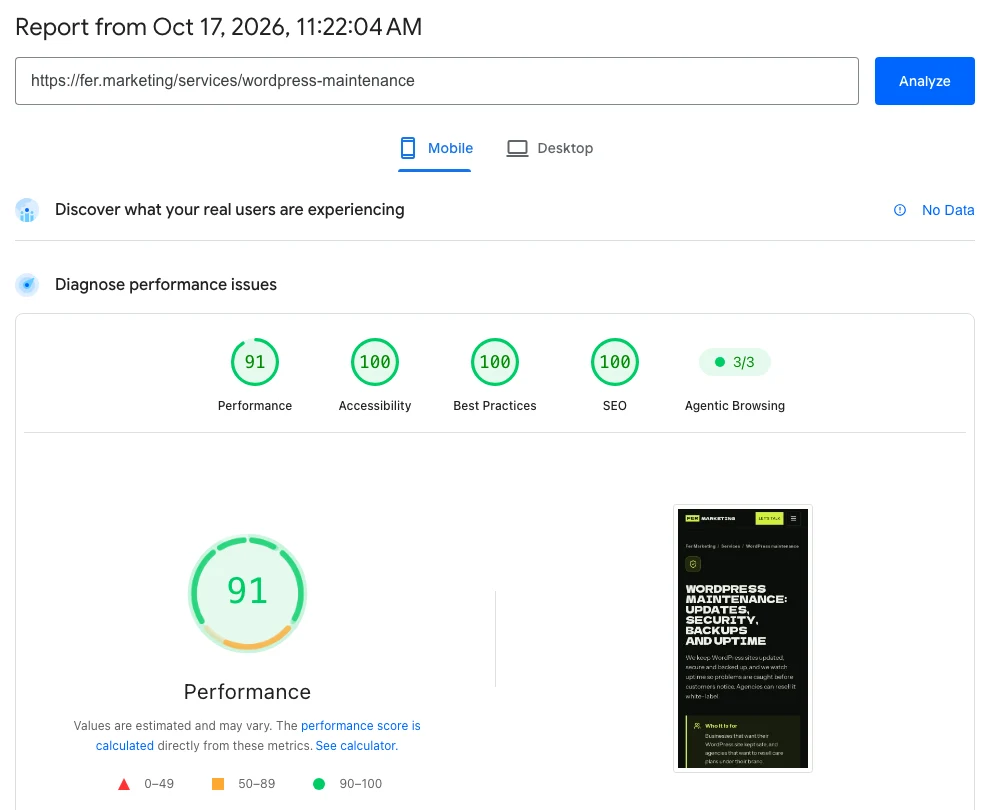
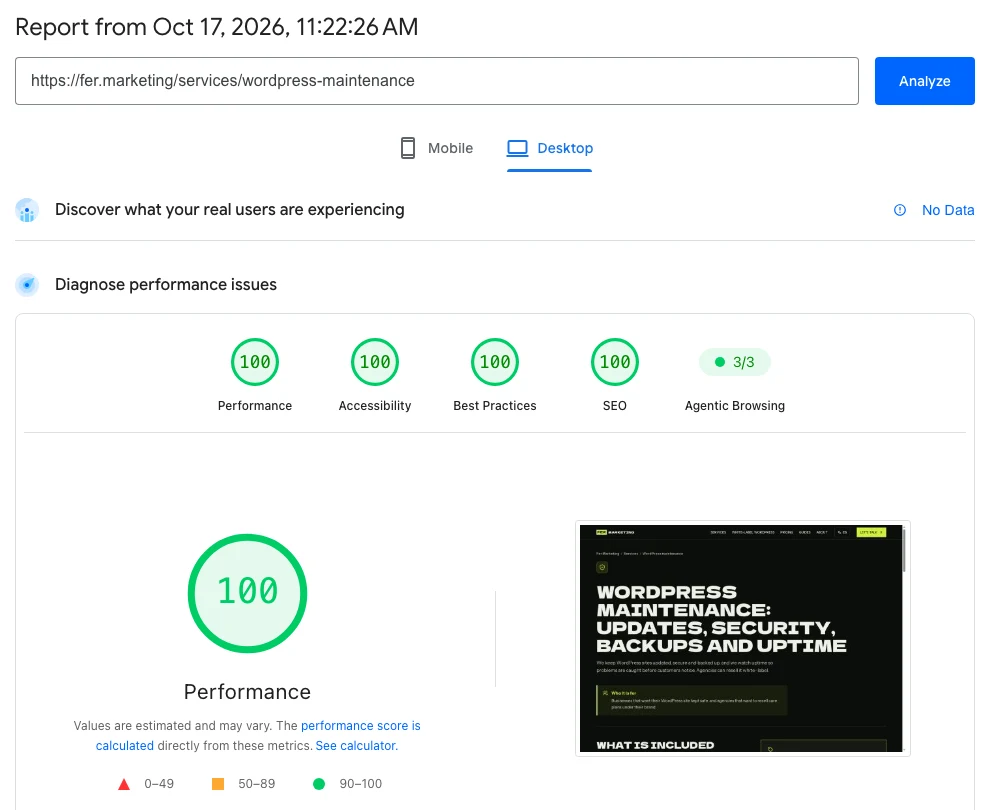
Every report showed Agentic Browsing 3/3 and No Data for field results because traffic was still low. These captures establish lab performance, not a real-user Core Web Vitals pass or a guarantee that your WordPress site will receive the same scores.
↑ Back to topFour cache layers that help speed up WordPress
Caching reuses work already done. Instead of asking WordPress and its database to rebuild the same public page for every visitor, a prepared copy can answer many requests, provided the copy stays current.
- 1. Browser cacheRepeat visitors reuse images, CSS and JS already saved on their device.
- 2. CDN edge (for example Cloudflare)Static files, and full pages if you allow it, are served from a data center near the visitor.
- 3. Server page cacheLiteSpeed Cache, Nginx FastCGI or Varnish hand out a ready HTML page without running PHP.
- 4. Object cacheRedis or Memcached keep database query results in memory for logged-in users, carts and admin.
- 5. PHP + MySQLWordPress builds the page from scratch. The slowest path; every layer above exists to avoid it.
Browser cache
Keeps reusable files on the visitor's device. It helps on later views, but cannot make an oversized image cheap to download for the first visitor.
CDN cache
Keeps eligible files near visitors. Cloudflare's free plan can cache static assets such as images, CSS and JavaScript; turning it on does not automatically cache WordPress HTML.
Server page cache
Stores complete public HTML so PHP and the database can be skipped. Depending on the host, use LiteSpeed's server cache, Nginx FastCGI cache or Varnish; QUIC.cloud can provide edge page caching.
Object cache
Redis can hold reusable WordPress data between requests when a persistent object-cache integration is configured. It helps database work, especially on uncached requests, but does not replace a page cache.
Cloudflare documents its default cache behavior: HTML is not cached by default. Public HTML caching requires deliberate rules or an integration, with exceptions for private and changing content.
The LiteSpeed installation guide distinguishes a compatible LiteSpeed server or QUIC.cloud from the plugin's other optimization features. Installing a cache plugin alone does not prove server page caching is working.
x-qc-cache: hitThis real response header indicates a QUIC.cloud cache hit on fer.marketing. The header to check on your site depends on its cache provider.
Images and fonts: show the important content first
A fast server can still deliver a slow page if the browser has to fetch a huge hero image, several font families and a video before showing the offer. We start with the content people see first, then reduce what the rest of the page downloads.
Useful image and font changes
- Resize images for where they appear.Serve responsive sizes so a phone does not download the desktop original. Compare WebP and AVIF at acceptable visual quality, keeping product detail and readable text intact.
- Load the hero promptly; defer images farther down.Keep the main visible image discoverable and avoid lazy-loading it. Give images width and height so content does not jump as they arrive.
- Reduce font families and unused weights.Keep text visible with a suitable fallback while brand fonts load. Check Spanish accents, bold text and layout shifts after any font change.
- Review video, sliders and third-party embeds.Use a lightweight preview or click-to-load treatment where appropriate. Keep essential booking and accessibility functions available.
The hero-image approach follows web.dev's LCP guidance. For text, web.dev's font guidance explains the tradeoffs between showing a fallback quickly and avoiding a shift when the brand font arrives.
↑ Back to topPlugins and page builders: remove the real drag
Plugin count alone is a poor diagnosis. One plugin that loads large scripts everywhere or makes slow external requests can matter more than several small plugins with narrow jobs.
We map what each important page loads and which feature needs it. A booking tool may belong on the booking page, while an unused slider library or duplicate analytics installation may have no business loading across the entire site.
Do
- Assign one tool to each optimization job.
- Test removing unused features on staging.
- Focus on pages people visit and buy from.
- Retest menus, forms and tracking after changes.
Don't
- Stack three competing page-cache plugins.
- Delay every script without testing interactions.
- Chase 100 on a page nobody visits.
- Delete useful business tools to improve a badge.
A heavy builder does not always require a rebuild
Elementor, Divi and WPBakery sites can accumulate nested layouts, animation and add-on packs. We first look for excessive page content, unused widgets and duplicated assets; a theme replacement is a separate decision with its own cost and disruption.
Our WordPress page builder guide explains that choice for owners and agencies. For a store, follow the WooCommerce optimization guide too, because logged-in accounts and checkout need different treatment from public landing pages.
↑ Back to topHosting, TTFB and a real WordPress portal
Time to First Byte (TTFB) measures how long the browser waits for the response to begin. If that wait is long, compressing images will not remove it; we inspect cache misses, server capacity, PHP work, database queries and external calls before recommending a hosting move.
- Law firm sites studied
- 300
- Took over 800 ms to start responding
- 11%
- Median TTFB
- 143 ms
Fer Marketing, October 2026: law firm website study. These are response measurements, not full page-load times.
CondoRoyalty: keep the tools, change delivery

For CondoRoyalty, we introduced a new server environment and a reverse-proxy layer that serves prepared lightweight HTML. A custom crawler automatically refreshes cached property pages, so visitors can browse prepared pages while the team keeps its existing publishing tools.
That approach needs a freshness plan for changing listings and a clear boundary around uncached features. A small brochure site may only need properly configured hosting and caching; a large catalog can justify more tailored work.
↑ Back to topOur WordPress performance audit and fix process
A useful WordPress performance audit ends with a prioritized work list and a way to verify each change. We agree which pages and customer actions matter before changing settings.
- Step 1
Measure the current experience
Record mobile and desktop tests for representative pages, available field data, response delays and customer journeys. Separate server waiting from image loading and browser work, and note cache conditions.
- Step 2
Agree the fixes and recovery plan
Rank changes by likely visitor benefit and risk, then confirm scope and a fixed written quote. Take a fresh backup and prepare protected staging for changes that need it.
- Step 3
Fix the bottlenecks
Configure compatible cache layers, improve expensive images and fonts, and remove unnecessary scripts or server work. Change related settings deliberately so a broken feature can be traced and reversed.
- Step 4
Verify the page and the business task
Repeat comparable tests with empty and prepared caches, then check phone navigation, forms, search, bookings or checkout. Confirm cache exclusions and content freshness before applying the tested work live.
- Step 5
Check live and hand over the evidence
Verify production after deployment, preserve new orders and submissions, and record before-and-after results with remaining limits. Watch available field data over time and leave clear guidance for future content changes.
Follow the WordPress maintenance checklist afterward. A new oversized banner, marketing widget or plugin update can change performance, so the handoff should explain what to watch as the site grows.
↑ Back to topChoosing a WordPress speed optimization service
Compare WordPress speed optimization services by what they measure and protect. Ask whether the proposal covers mobile pages, cache exclusions, business functions and a record of results, rather than only a promised score.
A clear scope
You should know the pages, changes, testing and handoff included in the quote. Hosting changes or a rebuild should be explained before you agree.
Evidence you can read
Expect the same pages tested before and after, with devices and lab versus field results labeled. Remaining issues should have a reason and a next action.
Agency delivery
We offer white-label work with staging on your agency domain. NDA and non-solicitation terms are available, with the scope agreed in writing.
Our WordPress management service starts from $250 with a fixed written quote before work. Send the URL and the problem by WhatsApp or fer@fer.marketing; we reply the same business day, 9 AM to 9 PM ET, in English or Spanish.
↑ Back to topWe can do this for you
Want us to make your WordPress site faster?
Send the site and the pages your customers use most. We will identify the work and confirm a fixed written quote from $250 before starting.
- Compatible page, browser and CDN cache settings, with exclusions
- Responsive images and appropriate hero loading
- Font and script loading improvements for key pages
- Mobile and desktop verification, including forms or checkout
- Before-and-after evidence and guidance for keeping pages fast
Frequently asked questions
What is WordPress speed optimization?
It is the work of reducing server delays, page weight and unnecessary browser processing so visitors can see and use pages sooner. It usually involves caching, images, fonts, plugins and hosting, with tests that confirm contact forms and sales functions still work.
Can you make my WordPress site load in one second?
That can be a useful target for important visible content under agreed conditions, but it cannot be promised for every device, connection and page. We measure your current site, identify realistic improvements and confirm the scope before quoting.
Which WordPress speed test should I use?
Start with PageSpeed Insights on mobile and desktop for several important pages. Review available real-user data separately from the Lighthouse lab score, save comparable runs and test the actual contact or buying journey on a phone.
Does a Google PageSpeed score of 100 mean I rank first?
No. Core Web Vitals contribute to Google's ranking systems, but a Lighthouse score is not a ranking promise. Helpful, relevant content and a usable page still matter, and a perfect desktop score does not establish good mobile performance.
Will Cloudflare's free plan cache my WordPress pages?
It can cache eligible static files, but HTML pages are not cached by default. HTML caching needs explicit configuration or an integration, with exclusions and testing for private sessions, carts, checkout and changing content.
Do I need Redis and a new hosting plan?
Only if the diagnosis supports them. Redis can reduce repeated database work through a persistent object-cache integration; it will not shrink a large hero image. We investigate uncached response times, server load and expensive requests before recommending a hosting move.
Can you speed up WordPress without replacing Elementor or my theme?
Often there are useful improvements to make first, such as better caching, lighter images and fewer unnecessary scripts. Some designs still need changes, but we assess the existing setup and explain the tradeoffs before proposing a rebuild.
How much does your WordPress speed optimization service cost?
WordPress management work starts from $250, with a fixed written quote before any work. Scope depends on the pages, hosting and features involved. We also work white-label for agencies, and reply the same business day during 9 AM to 9 PM ET.
Send your URL for a fixed written quote from $250 and a same-business-day reply, with white-label delivery available for agencies.