GoHighLevel automation: what to automate first
Start with a repeated handoff: a lead arrives, someone takes responsibility and the next action gets recorded. Define entry and exit conditions first; automating an unclear sales process spreads its problems.
GoHighLevel workflows: triggers before custom code
HighLevel's native workflows use triggers and actions for tasks such as assigning leads, updating pipeline opportunities and sending appointment reminders. Check the actions available in your account before commissioning custom work. The HighLevel help center and Workflow Builder walkthrough explain the native building blocks.
| Job | Trigger | Useful action | Stop condition |
|---|---|---|---|
| Lead assignment | Form submitted | Assign owner + notify | Owner takes over |
| Appointment reminder | Booking confirmed | Send timed reminder | Canceled or changed |
| Sales follow-up | Pipeline stage | Create task or message | Reply or opt-out |
| Onboarding | Customer confirmed | Request missing details | Details complete |
| Reactivation | Eligible inactive lead | Approved invitation | Reply or opt-out |
Native workflow, API integration or external tool?
Native HighLevel workflow
Use when the trigger, action and data already live in HighLevel. Your team can inspect and edit straightforward reminders and pipeline tasks.
Custom API integration
Use for missing native actions, complex matching or controlled recovery. Confirm both systems expose the required operations.
n8n, Make or Zapier
Coordinate supported tools without building every connection. Check field access, execution history, retries and who maintains the connection.
HighLevel API integration: check the actual operation
An API lets another system read or change permitted records; a webhook notifies it that something happened. HighLevel documents contacts, custom fields, opportunities, calendars and webhooks in its official developer docs. We check authentication, permissions and supported events against your intended workflow before proposing the connection.
Do: choose by the business rule
- Use a native action when it covers the whole job.
- Add custom logic for a specific missing capability.
- Test updates, cancellations and interrupted runs.
- Give each connection a named owner.
Don't: connect tools without a plan
- Assume a connector supports every screen field.
- Put the same follow-up in multiple systems.
- Treat a successful demo as failure recovery.
- Share a master login across clients.
Compare n8n vs Make vs Zapier for external orchestration. Our API integration services cover custom matching, recovery and reporting around those connections.
↑ Back to topGoHighLevel offline conversions for Google Ads
A form fill and a booked consultation are different outcomes. Sending the booked stage back to Google Ads makes that later event available for measurement and, when configured appropriately, bidding. It does not guarantee better campaign results.
In 100 recent Upwork job posts we reviewed in October 2026, 3 mentioned GoHighLevel. One tracking brief asked for a clinic's ads to optimize toward a consultation booked in the CRM, rather than form fills or calls. These are observations from our own sample, not a measure of the whole market.
- 1. Define
Agree on the booked event
Name the qualifying pipeline stage and configure its Google Ads conversion action. Define how rescheduling, cancellations and multiple opportunities should count.
- 2. Capture
Keep the click ID through the form
Capture gclid from the ad landing URL into a hidden form field when present. Test redirects, later page visits and embedded forms; a successful submission does not prove attribution survived.
- 3. Store
Save attribution on the contact
Map it into a contact custom field linked to the relevant opportunity. Agree on first-touch or later-touch handling so returning visits and blank submissions do not overwrite the intended attribution.
- 4. Send
Report the booked pipeline stage
On the qualifying stage, submit the identifier, conversion action and actual event time through a currently supported Google upload route. Use a stable event reference and an agreed value, if applicable.
- 5. Verify
Check acceptance and repeat handling
Compare eligible CRM events with upload diagnostics. Keep a sent-event register so moving an opportunity away and back does not count the booking again; investigate missing identifiers.
Google explains matching in its offline conversion imports guide and capture in its GCLID setup guide. Verify the current upload method during implementation: Google's guidance describes a migration to the Data Manager API and recommends enhanced conversions for leads for new setups.
↑ Back to topAI inside HighLevel flows, with approval
A GoHighLevel AI agent should have a narrow job
Start with drafting replies, summarizing a conversation or suggesting the next task. Give the AI approved information and access only to the contact and tools needed for that request. Use AI agent development when the job requires reasoning across systems rather than a fixed sequence.
- Request or scheduleA person asks, or the agent wakes up on a timer.
- Read contextApproved documents, CRM records, past conversations.
- Plan and use toolsSearch, read a record, draft a reply, calculate. Each tool has narrow permissions.
- Ask before risky actionsMoney, deletions and messages to customers wait for a human yes.
- Act and logThe result, the sources used and the cost of the run are saved.
Draft before sending
Show the proposed reply, recipient and supporting information to the responsible person. Require fresh approval if the draft or recipient changes, and leave unapproved drafts unsent.
Separate knowledge and permissions
Retrieve information within the correct client account. A message asking the AI to ignore instructions must never grant access to another client's contacts or private records.
Hand off with useful context
Route missing information, complaints and uncertain requests to a person. Include the conversation summary and attempted actions so the customer does not have to start again.
Another reviewed brief wanted first AI agents connected to HighLevel, Outlook, Google Workspace and Zoom, with security, data separation and monitoring; it specifically valued HighLevel experience. In 100 recent Upwork job posts we reviewed in October 2026, 8 asked for human review, approval or handoff in AI workflows.
↑ Back to topPrevent duplicate contacts and two-way sync loops
Two-way sync needs an owner for each field. Your application might own subscription status while HighLevel owns the assigned salesperson; copying every edit in both directions can create endless updates. A webhook is a notification to process carefully, not permission to create another contact each time.
- 1. One source of truth per fieldDecide which system owns price, stock, status and contact data before writing code.
- 2. Webhooks plus a nightly checkChanges move in real time; a scheduled reconcile catches anything a webhook missed.
- 3. Idempotency keysThe same event processed twice still creates one order, one charge, one email.
- 4. Retries with backoffRate limits and timeouts retry later; events that keep failing go to a review queue.
- 5. Logs and alertsYou can see what synced, when, and why something did not.
Acceptance checks for a dependable connection
- Match existing contacts before creating new ones.Store the IDs from both systems. Agree on normalized email and phone matching, shared addresses, changed numbers and ambiguous matches that need a person's decision.
- Give each business event a stable reference.Record the reference before repeating an action. Duplicate webhooks or simultaneous runs should reuse the same event identity, with a storage rule that prevents concurrent processing.
- Stop updates from echoing back.Track where a change originated and compare meaningful field values. An update produced by the integration should not restart the same action in the other system.
- Retry temporary failures with limits.Space retries progressively, respect API limits and surface persistent failures. A permission error needs investigation; repeating it indefinitely adds noise and cost.
- Recover missed changes and preserve opt-outs.Reconcile records on an agreed schedule, such as nightly. Resolve discrepancies under field ownership rules and never let a sync silently restore a suppressed contact to messaging.
In 100 recent Upwork job posts we reviewed in October 2026, 16 explicitly asked to prevent duplicates or make an action happen exactly once. We design for safe repeat delivery and test the observable result, rather than promising that external systems will never send an event twice. Logs should identify the account, record and outcome without exposing unnecessary personal data.
↑ Back to topReal CRM work, the same integration discipline
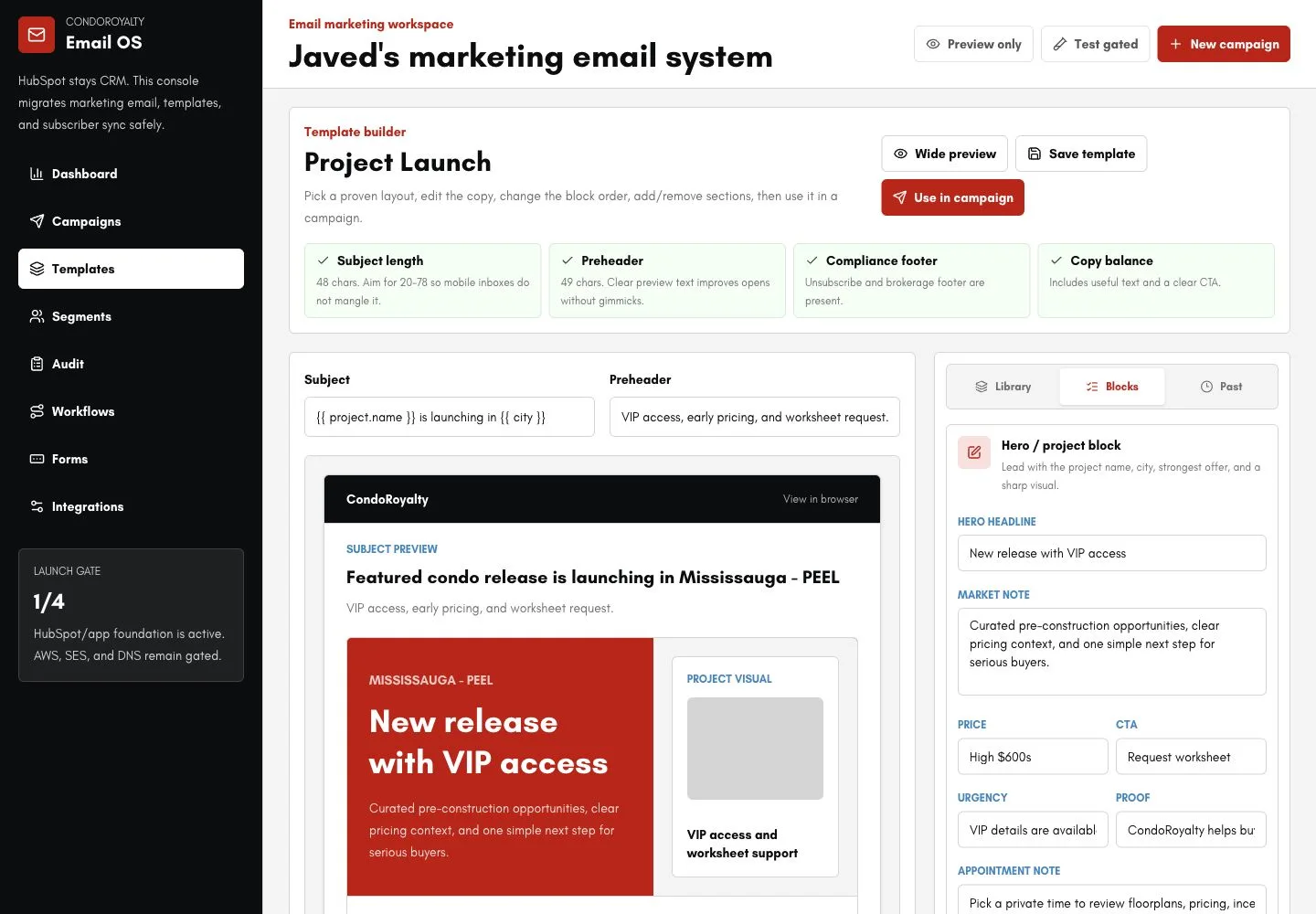
CondoRoyalty Email: contacts connected to campaigns
CondoRoyalty Email keeps HubSpot contacts synchronized and sends through Amazon SES. The platform includes gradual sending, suppression rules, campaign safeguards, templates, scheduling and reporting. Contact state and sending permissions must stay consistent across systems.
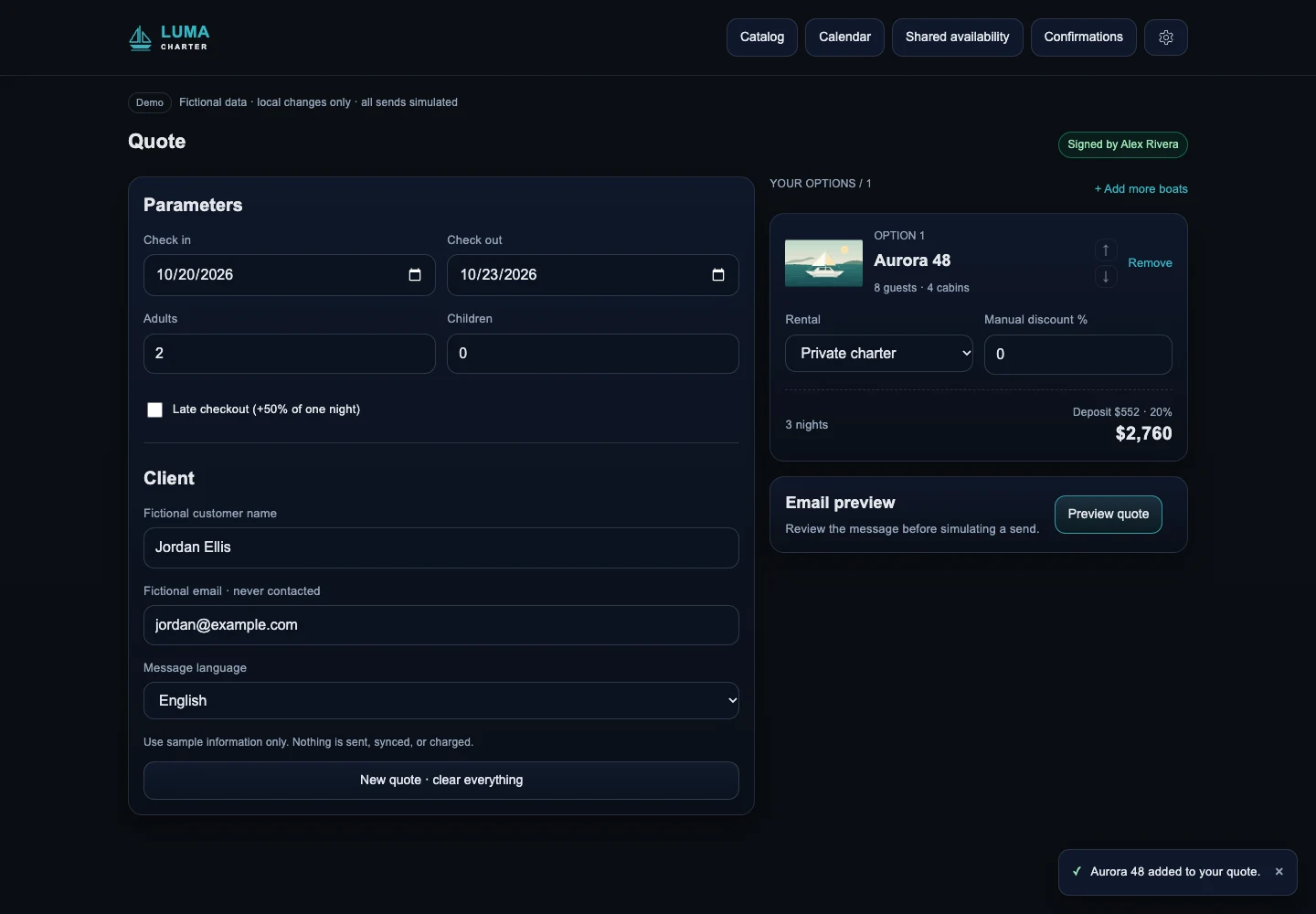
San Blas On Board: CRM and calendar coordination
San Blas On Board connects boats with different owners and rules through rule-based quotations, Google Calendar and Clientify CRM. Each booking must carry the records and information the next person or system needs.
For agencies: white-label and sub-account control
Agency work needs shared standards and separate client data. Define a reusable workflow baseline, then keep client calendars, credentials, sending identities and pipeline mappings in that client's configuration. Copying a workflow should never copy another client's live identifiers.
Keep each sub-account separate
Scope access to the intended account and validate the account identity on each incoming event. Test that a contact or AI request from one client cannot retrieve or change another client's data.
Report across accounts consistently
Agree on definitions for leads, bookings and revenue before combining reports. Map equivalent stages, time zones and date ranges, and flag missing data instead of silently treating it as zero.
Deliver under your brand
Our white-label development service works under your agency's brand, with NDA and non-solicitation available. Agree on client communication, release approval and support responsibilities in the scope.
The remaining GoHighLevel brief described application-to-CRM lifecycle flows: abandoned intakes, onboarding, refills, win-backs and reviews. For health applications, establish data-handling requirements and share only necessary operational information. An integration alone does not establish regulatory compliance.
↑ Back to topGoHighLevel automation: how we build
Bring the problem and a sample record with private details removed. We define the workflow, access plan and acceptance checks. Founder Fernando Marcano is an IT engineer with 20+ years of hands-on IT experience; Fer Marketing is operated by Fer LLC in Wyoming.
- Step 1
Map the current journey
Identify entry points, existing workflows, connected tools and the person responsible for each exception. Record the desired result and the actions that must stay manual.
- Step 2
Confirm feasibility and quote
Check the necessary native actions, API operations, permissions and sample data. Agree on deliverables, exclusions and acceptance criteria in a fixed written quote before work starts.
- Step 3
Build a contained pilot
Configure the workflow and agreed integration with test records and restricted access. Keep customer messages and advertising uploads disabled until the relevant checks are approved.
- Step 4
Test difficult cases with your team
Repeat an event, change an email, cancel a booking and interrupt a connection. Verify approval gates, opt-outs and sub-account separation, then demonstrate recovery and the pause procedure.
- Step 5
Release and hand over
Launch the agreed scope with monitoring, named alert recipients and a recovery plan. Deliver source code, field mappings, operating instructions and responsibility for future changes.
Running costs and control after launch
Separate build and operating costs when comparing workflows, connections, data cleanup and approvals. Our AI automation cost guide explains scope and ongoing responsibilities.
Platform and infrastructure
Account for HighLevel, external tools, hosting and message delivery. Check current provider pricing against your account and expected activity.
AI and execution usage
Estimate messages, context, runs and retries. Set spending alerts and a pause mechanism to stop repeated failures generating paid requests.
Maintenance and staff time
Assign draft reviews, contact exceptions and alerts. Agree on support coverage, credential renewal and maintenance when provider integrations change.
Workflow goal and current point of failure
HighLevel account structure and connected tools
Example trigger, expected action and stop rule
Approximate activity and known duplicate issues
Approval owner and required reporting
Keep credentials out of the initial message. Contact us with the process description; we reply the same business day, 9 AM to 9 PM ET, by WhatsApp, phone or the contact form. Payment is by card through Stripe after the scope is agreed.
↑ Back to topWe can build this for you
Want us to build your HighLevel automation?
Send the workflow and systems involved. We will define the deliverables and acceptance checks in a fixed written quote before work starts.
- Native workflows and custom connections in the agreed scope
- Contact matching, field mapping and duplicate protection
- Approval gates, failure alerts and recovery checks
- Client-owned source code, accounts and operating documentation
- White-label delivery and sub-account controls for agencies
Frequently asked questions
What can I automate with GoHighLevel workflows?
Start with lead assignment, pipeline tasks, appointment reminders and follow-up with reply and opt-out rules. Use native actions where they cover the job; external systems and complex matching may need an integration with recovery controls.
When do I need a GoHighLevel developer?
Consider custom work for missing native actions, complex contact matching or controlled two-way sync. Confirm API operations, field ownership and failure handling before commissioning it. We provide a fixed written quote for the agreed scope.
Can GoHighLevel send offline conversions to Google Ads?
A connection can report a booked CRM stage through a supported Google import route, using valid attribution, conversion details and duplicate protection. Calls need suitable tracking or a call conversion setup; a phone number alone is insufficient.
Can an AI agent draft replies inside a HighLevel process?
Yes, subject to integration capabilities and account permissions. Start with drafts from approved information, reviewed before sending. Define permitted data, approval gates, client separation and a person responsible for uncertain requests.
How do you prevent duplicate contacts and sync loops?
Use agreed contact matching, linked record IDs, field ownership and stable event references with concurrency controls. Track change origins and compare values to prevent echoes, then reconcile missed updates. Send ambiguous matches to a person.
Do you have a GoHighLevel case study?
We do not have a published GoHighLevel case study. Relevant work includes CondoRoyalty Email with HubSpot and Amazon SES, and San Blas On Board with Clientify CRM and Google Calendar. These demonstrate integration work in other systems.
Can you work white-label for our agency?
Yes, under your brand, with NDA and non-solicitation available. We agree on communication, sub-account access, release approval and handover. Clients own the code, accounts and documentation; your agency keeps the client relationship.
What does GoHighLevel automation cost to build and run?
We give a fixed written quote before work starts. Budget separately for platforms, messaging, hosting, AI usage, maintenance and staff time for approvals and exceptions. Check current provider pricing against your expected activity.
Request a fixed written quote through our contact form, WhatsApp or phone for a same-business-day reply, 9 AM to 9 PM ET, with white-label delivery available for agencies.