AI automation services we build
AI agents
An assistant that reads business context and uses approved tools to complete a task. Explore AI agent development, including permission limits and human approval.
Chatbots
Answer product questions, help visitors find information and pass unresolved conversations to your team. See AI chatbot development for websites and connected support workflows.
Workflow automation
Move a request from a form into your CRM, assign follow-up and notify the right person. Our workflow automation services start with your actual operating rules.
API integrations
Connect systems so contacts, orders and status changes agree. See API integration services for synchronization, recovery after failures and clear ownership of each field.
SaaS and MVP builds
Build a customer-facing product or an internal portal around a focused first release. Our SaaS MVP development covers the usable product and the operations behind it.
Rescue an existing app
Find out what is safe to keep in an unfinished or unreliable app. We fix AI-generated code and scope repairs around the paths your customers depend on.
Custom web apps
Portals, internal tools and booking or quoting systems built around how your business already works. See custom web app development.
GoHighLevel automation
Workflows, API sync and offline conversions for agencies and businesses running on HighLevel. See GoHighLevel automation.
Choose the outcome before the platform. AI automation services can combine business rules with AI for reading or drafting; predictable tasks may need no AI. Prepare your brief with these guides:
Understand the costs
Separate the initial build from subscriptions, AI usage and ongoing care in our AI automation cost guide.
Compare automation platforms
Use n8n vs Make vs Zapier to weigh maintenance, access and the shape of your workflow.
Choose a builder
Ask for relevant proof, failure handling and ownership terms. Read how to hire an AI developer.
Agent or chatbot?
Answers only, or answers plus actions? Decide with AI agent vs chatbot before you scope the build.
What businesses are asking for right now
In 100 recent Upwork job posts we reviewed in October 2026, 23 were for SaaS or web app builds, 12 for API integrations and 9 to rescue, finish or review an existing app. The chart shows the relevant primary categories from our review. This is a snapshot of that sample, not a market share estimate.
Fer Marketing review of 100 Upwork job posts, October 17, 2026
Manual copy-paste
Staff move the same customer information between tools, then spend time correcting it.
Actions running twice
Repeated notifications or clicks create duplicate follow-ups, files or payment actions.
Apps nobody trusts
An AI-built demo looks finished, but the owner cannot trust it with customers or money.
Cost and lock-in
Owners want to understand running costs and manage their accounts without depending on one developer.
AI needs permission
A useful assistant still needs a person to approve sensitive actions and handle exceptions.
Data must match
Reports, orders and CRM records need consistent totals and a clear source of truth.
Methodology, budgets by category and the screening questions buyers asked are in our AI automation hiring report 2026.
↑ Back to topAI automation for small business: start here
Start with a repetitive task whose input, result and exceptions you can explain. Pick a real problem with a manual fallback during testing. Clarify a confusing process before automating it.
| Task | Automate? | Why |
|---|---|---|
| Form to CRM | Good start | Clear fields and owner |
| Appointment reminder | Good start | Known trigger and consent |
| Inbox sorting | AI can assist | Staff can correct labels |
| Draft a quotation | Rules + review | Check price and exceptions |
| Refund decision | Approval first | Money and judgment |
| Unclear sales process | Clarify first | No agreed next action |
Business automation services need a baseline
Bring ordinary requests, awkward exceptions and the time spent handling them. Agree on an acceptance test, such as a valid lead reaching the correct salesperson without duplicate records. After launch, compare completed work, corrections and staff effort against that baseline.
↑ Back to topFrom a business request to a completed task
A useful workflow begins with an event: a submitted form, changed order or scheduled check. It validates the information, applies your rules, updates the right tools and records what happened. AI can help interpret an email or draft a response where rigid rules would be awkward.
- TriggerA form, a new order, an email, a row in a sheet or a schedule.
- Get and clean the dataPull the record, check required fields, normalize names, dates and phones.
- DecidePlain rules first. AI only where judgment on text is needed.
- Act in your toolsCreate the CRM deal, send the email, update the order, post to Slack.
- Log and alertEvery run is logged. A failure pings a person instead of failing silently.
Agree on the source of truth
Choose which system owns each field. For example, the billing system owns payment status while the CRM owns the salesperson assignment.
Plan for missing information
An order without a matching customer should enter a review queue with a reason. Guessing silently creates work for whoever reconciles the records later.
Recover when a tool is unavailable
Retry safe operations with limits, then alert the responsible person. Reconcile records later so a temporary interruption does not leave the tools disagreeing indefinitely.
For WordPress-specific work, see WordPress web design and managing WordPress with AI. The same questions apply: what triggers the action, who authorizes it and how do you verify the result?
↑ Back to topAn AI agent needs permission and a stop button
An agent can read context and use tools across several actions. That makes permissions part of the product: reading an order is different from canceling it. A customer message or retrieved document must never grant the assistant extra authority.
- Request or scheduleA person asks, or the agent wakes up on a timer.
- Read contextApproved documents, CRM records, past conversations.
- Plan and use toolsSearch, read a record, draft a reply, calculate. Each tool has narrow permissions.
- Ask before risky actionsMoney, deletions and messages to customers wait for a human yes.
- Act and logThe result, the sources used and the cost of the run are saved.
Controls to agree on before launch
- Define allowed actions.Specify what the agent can read, draft and change, using only the account permissions it needs.
- Require approval for sensitive changes.Refunds, deletions and commitments need an explicit policy and an identified approver.
- Verify identity before showing private data.Knowing an email address or order number alone should not expose another customer’s information.
- Set limits and a human handoff.Bound usage and repeated attempts, and route uncertain requests to a person with useful context.
- Keep a pause control and action history.Your team needs to see what happened, stop new actions and investigate without guessing.
Real products and business workflows we built
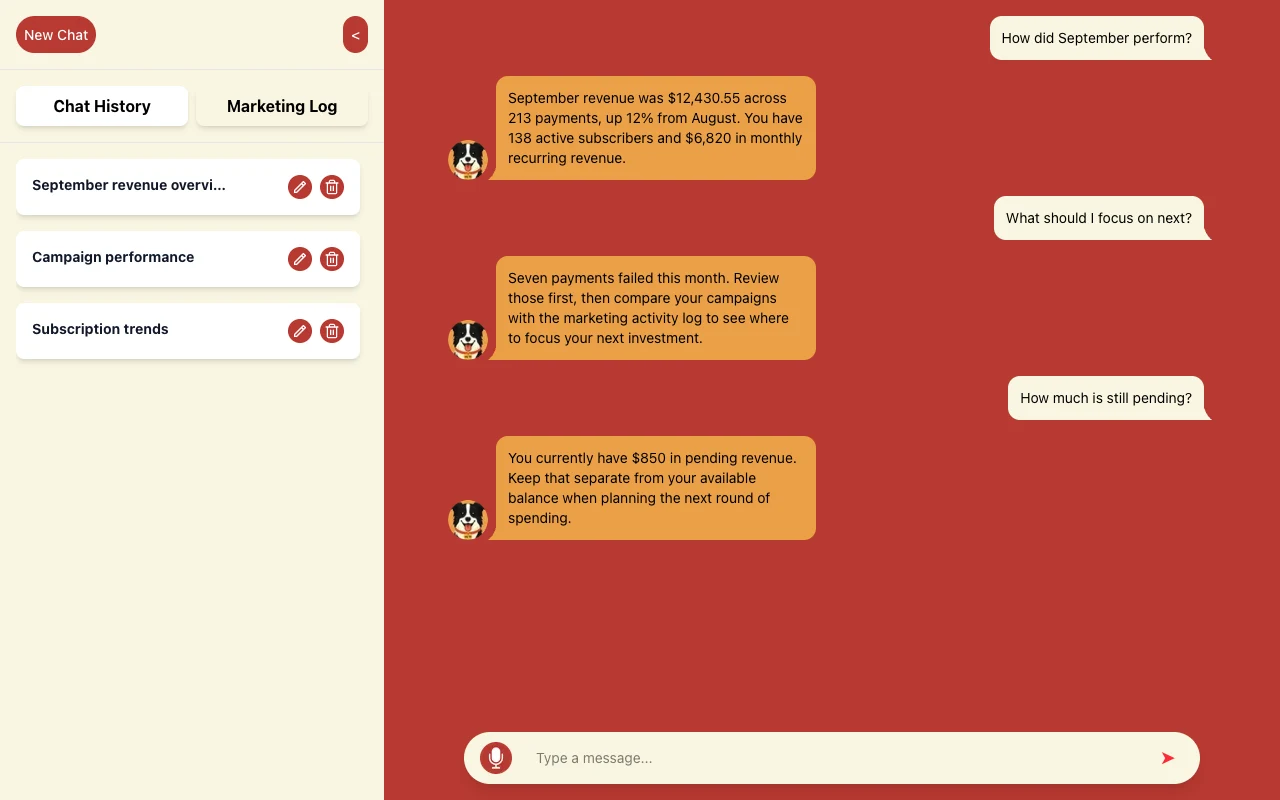
WLTR.AI is a conversational way to understand revenue, subscriptions and marketing activity; our role was the product build. The user asks a business question in chat and receives an answer about the underlying business data.
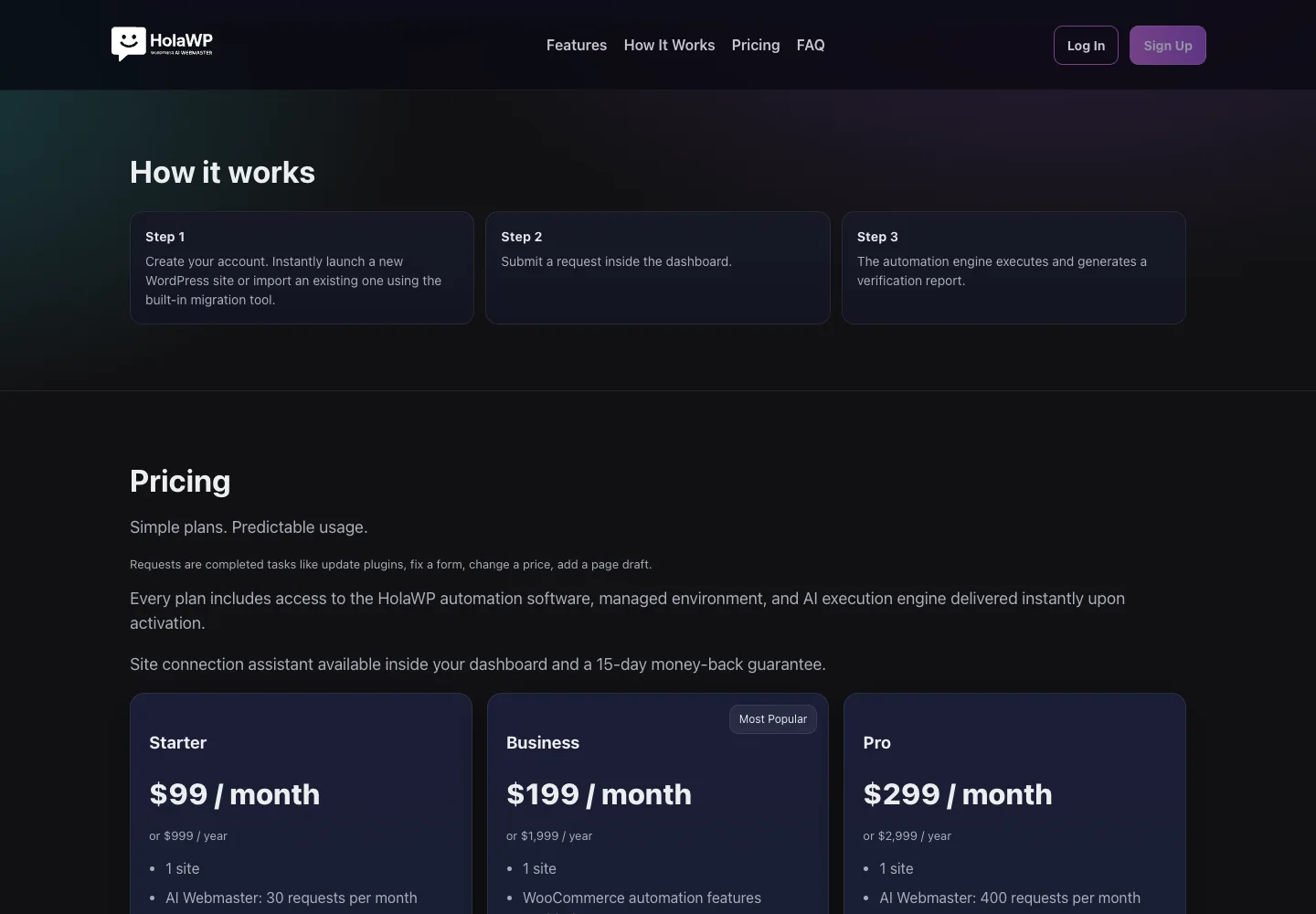
HolaWP is our own SaaS for WordPress setup, staging, migration and troubleshooting. A dashboard request goes to an automation engine that executes the work and generates a verification report.
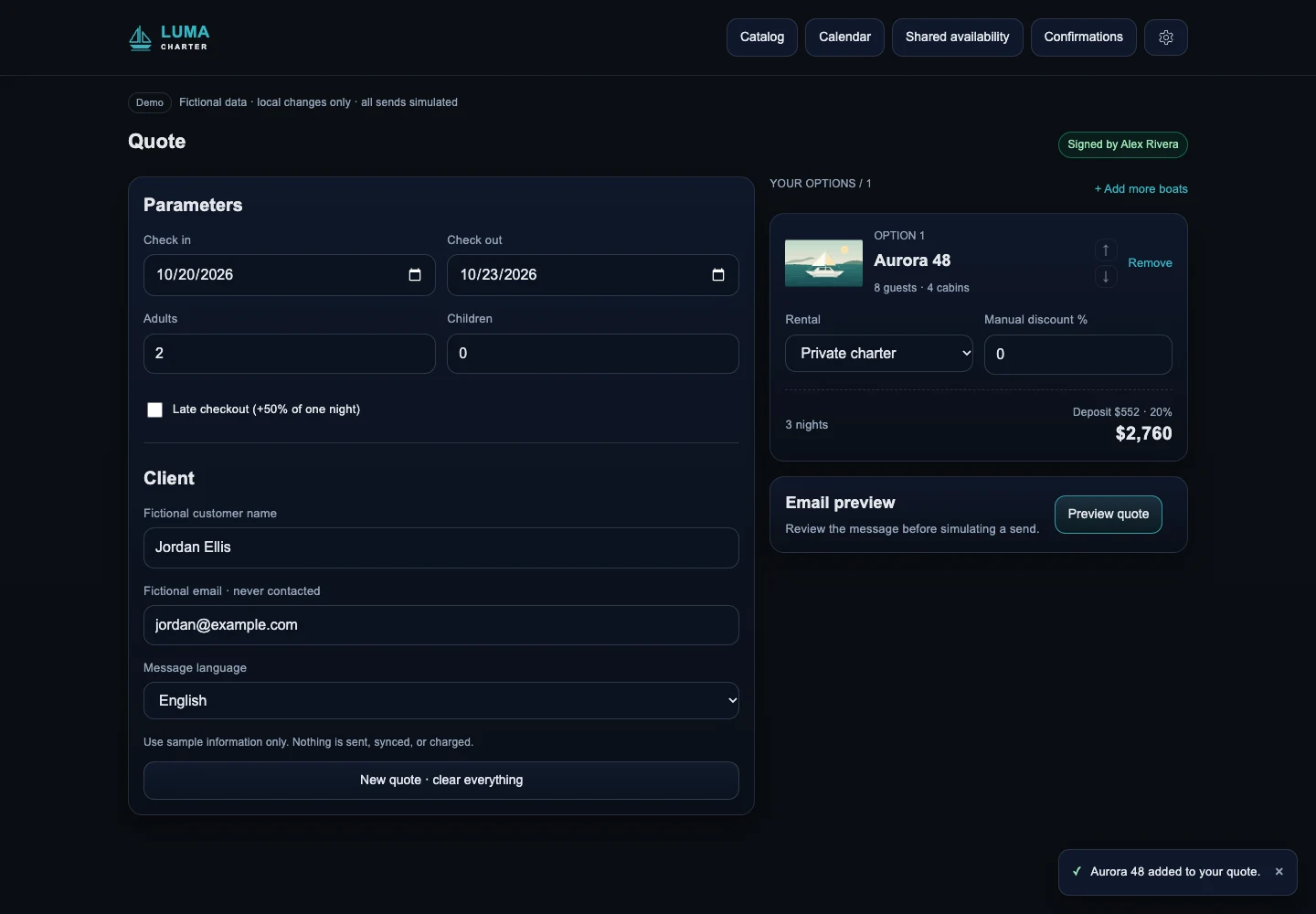
San Blas On Board brings 30+ boats with different owners and rules into one booking workflow. Quotations that took 15 to 30 minutes now take under five, according to the project owner, alongside calendar coordination and guest check-in.
How our AI automation agency delivers your project
The scope explains deliverables and acceptance checks. Before building, we identify dependencies: account access, existing data and decisions your business must make.
- Step 1
Discovery call
Walk through the current process, tools and exceptions. We identify the first useful outcome and who will use, approve and maintain the system.
- Step 2
Written scope and fixed quote
Agree on deliverables, exclusions, acceptance checks and responsibilities before any work starts. Payment is by card through Stripe after the scope is agreed.
- Step 3
Build in your accounts
Keep the project in accounts and a source repository you control. Use separate access for collaborators and keep test work away from live customer actions.
- Step 4
Test with real data
Use agreed, authorized examples, including missing fields, repeated requests and failures. Protect sensitive information and check the whole outcome, including staff notifications and records.
- Step 5
Launch with logs and alerts
Check the live path, record execution results and route failures to a named person. Agree on how to pause the system and recover if the release needs to be reversed.
- Step 6
Handover and optional care
Deliver source code, account details and documentation covering operation, exceptions and recovery. Define optional maintenance separately so you know who handles future changes.
Understand build costs and ongoing running costs
Every project gets a fixed written quote before work starts. Scope depends on connected tools, data quality, permissions, approvals and error consequences. Discuss running costs separately: a prototype and a busy production workflow consume different resources.
Platforms and hosting
List the automation platform, hosting, database and any messaging services. Identify who pays each provider and which accounts your business must maintain.
AI and execution usage
Estimate cost from expected request volume, document size and repeated attempts. Add usage alerts and agreed limits, and review actual consumption after launch.
Maintenance and staff time
Budget attention for failed runs, updated business rules and provider changes. Include the person who reviews drafts or exceptions when assessing whether the automation is worthwhile.
Our AI automation cost guide explains the cost layers in more detail. Ask what happens if usage grows, an integration changes or you move to another provider. Ownership helps you move, but migration still takes work.
Task and tools involved:
Example input and correct result:
Typical volume and busy periods:
Actions that need approval:
Current failures and manual fallback:
Who owns the process and provider accounts:
Reliability you can ask a builder to demonstrate
Exactly once: a business result to test
If a payment notification arrives again, it should not produce another fulfillment. Give each business action an identifier and check whether it already completed before repeating it. Stripe’s idempotent requests documentation explains safe retries, while its webhook guidance covers duplicate events.
Do: choose a partner who shows the controls
- Demonstrates relevant work and explains their role.
- Tests repeated requests, approvals and failed runs.
- Shows logs, alerts and a recovery procedure.
- Builds in your accounts and repository.
- Defines acceptance and ongoing responsibilities.
Avoid: red flags in a proposal
- A polished demo with no explanation of failures.
- Sensitive actions without approval boundaries.
- No estimate of ongoing usage or operating effort.
- Accounts and source code held by the supplier.
- A vague promise to automate the whole business.
During acceptance, ask to see a duplicate request and a failed connection handled. Logs should identify affected records, completed actions and problems, while limiting private data. Keep access to your accounts, repository and documentation throughout the project.
↑ Back to topFor agencies: white-label AI automation
Our white label AI automation work runs under your agency’s brand. You keep the client relationship; we agree on delivery, communication and handover through a written scope. See our white-label development service.
Agree on the working relationship
NDA and non-solicitation terms are available. Define who contacts the client, who approves changes and which accounts the end client owns.
Give your team a usable handover
Source code, accounts and documentation belong to the client. Include operating instructions and exception handling so your agency can support what it sells.
Who is behind the work?
Fer Marketing is operated by Fer LLC in Wyoming. Founder Fernando Marcano is an IT engineer with 20+ years of hands-on IT experience; our homepage shows 100+ Upwork projects with 100% Job Success. We serve the US market in English and Spanish.
↑ Back to topWe can build this for you
Want us to build your automation or software?
Send us the task, tools and examples of a correct result. We define the work and provide a fixed written quote before any work starts.
- Written scope with deliverables and acceptance checks
- Agreed agent, chatbot, workflow, integration or SaaS build
- Permissions, approval rules and failure handling
- Launch with logs, alerts and a documented recovery process
- Your source code, accounts and operating documentation
Frequently asked questions
What does an AI automation agency do?
It designs and builds systems that complete business tasks across your tools. That can mean an AI assistant, a support chatbot, a workflow, an integration or a custom SaaS product, with rules for permissions, errors and human review.
Which AI automation services should a small business start with?
Start with a frequent, clearly defined task such as moving valid leads into a CRM or preparing a draft for staff review. Choose a process with accessible data, a responsible owner and a manual fallback so you can evaluate it safely.
How much does business automation cost?
We provide a fixed written quote after defining the work and before starting. Scope depends on the tools, data, permissions and reliability requirements; platform subscriptions, AI usage and optional maintenance are separate running-cost considerations.
Is AI automation worth it for a small business?
It is worth it when a task repeats often, follows rules you can write down and costs time or money when done by hand. Start with one process, measure the time saved and the errors avoided during a pilot, then decide whether to expand. If a task is rare or changes every time, a checklist may serve you better than software.
What AI automation services do you offer?
We build AI agents, website and WhatsApp chatbots, workflow automations in n8n, Make or Zapier, custom API integrations, SaaS and custom web apps, and repairs of apps built with AI tools. Every project starts with a written scope and a fixed written quote.
Do I need an AI agent or a chatbot?
A chatbot primarily handles a conversation; an agent can use permitted tools to carry out tasks. Some projects combine both, while a rule-based workflow may be enough for a predictable process without an AI component.
Can you finish an app built with AI tools?
Yes. We review the existing app, identify risks in the important customer paths and define what to repair, keep or replace. A working demo alone does not establish that access controls, payments or data handling are ready for production.
Will I own the code and provider accounts?
Yes. Source code, accounts and documentation belong to the client. We build in accounts and a repository you control, and document operation and recovery so ownership includes practical access to maintain the system.
Can AI take actions without asking me every time?
Yes, for actions you explicitly authorize within agreed limits. Sensitive changes can require approval, and unclear cases should reach a person; the scope should define permissions, usage limits and how to pause new actions.
Do you offer white label AI automation for agencies?
Yes. We work under your agency’s brand, with NDA and non-solicitation terms available. We agree on client communication, approvals, ownership and documentation so the delivery fits your relationship with the client.
Contact us for a fixed written quote and a same-business-day reply, from 9 AM to 9 PM ET, with white-label delivery available for agencies.