When custom web app development makes sense
Build when the part that makes your operation different is the part existing software cannot handle. Repeated spreadsheet corrections, staff copying records between systems and customers calling for information you already hold are useful starting points. First check whether configuring your existing tools would solve the problem.
| Situation | SaaS or no-code | Custom |
|---|---|---|
| Unique pricing | Fits available rules | Your quote logic |
| Several staff roles | Fits built-in access | Access per action |
| Data ownership | Check export options | Your database |
| Offline field work | Verify offline support | Scoped sync queue |
| Missing integration | Try existing connectors | Direct API connection |
Before commissioning custom business software, collect examples of exceptions: a customer with negotiated pricing, an order that changes after payment, or an employee covering another location. Those exceptions reveal the real scope. A list of screens alone rarely does.
↑ Back to topApplications for the business you already run
Customer portal development
Give customers their own orders, documents, invoices and request history. Decide what they can change themselves and what needs staff approval before building the account area.
Internal tools development
Put job assignments, approvals, quoting and follow-up in a shared workspace. Include the work people currently track in private spreadsheets, with an accountable owner for each task.
Field apps and business dashboards
Help crews record work from a phone, or let managers see reports across existing systems. Offline capture and report definitions need their own scope, rather than being assumed features.
In 100 recent Upwork job posts we reviewed in October 2026, 23 were for SaaS or web app builds: 12 non-AI portals and MVPs, and 11 AI-powered products. That grouping includes new products as well as business tools; it is a snapshot of the posts reviewed, not a market-wide estimate.
Requests included a testing-service portal with customer accounts, order history, lab routing, affiliates and payments, described as production-quality work rather than a quick prototype. Others sought a secure web version of an existing permit-to-work application, offline clock-in and checklists with a sync queue for field crews, or reporting for advisors serving many small businesses.
↑ Back to topWhat a business web application needs to work
A polished demo does not tell you whether customers can see each other's records, a failed payment leaves an order open, or a lost phone exposes job details. We turn those questions into written acceptance checks. The scope should cover the ordinary working day and the predictable exceptions.
Roles and permissions
Define customer, staff, manager and administrator access by action. Test that a customer cannot reach another account's records, including through a copied link or an export.
An audit trail
Record who changed a quote, approved a refund or reassigned a job, and when. Agree which changes matter and how long to keep that history without storing unnecessary private data.
Payments and integrations
Treat payment confirmation, duplicate events, cancellations and refunds as part of the workflow. Decide which application owns each record and where failed updates go for review.
Backups you can restore
Set recovery expectations for the database and uploaded files. Verify a restore and document who can run it; a backup notification alone does not prove recovery works.
Offline or PWA when needed
A browser app does not automatically work without signal. Scope locally saved work, a visible sync queue, conflict rules and shared-device privacy if crews need offline access.
Accessibility and daily usability
Plan keyboard access, readable labels, clear errors and usable phone layouts. Staff should be able to correct an entry or resume interrupted work without guessing what was saved.
Business rules made visible in real projects
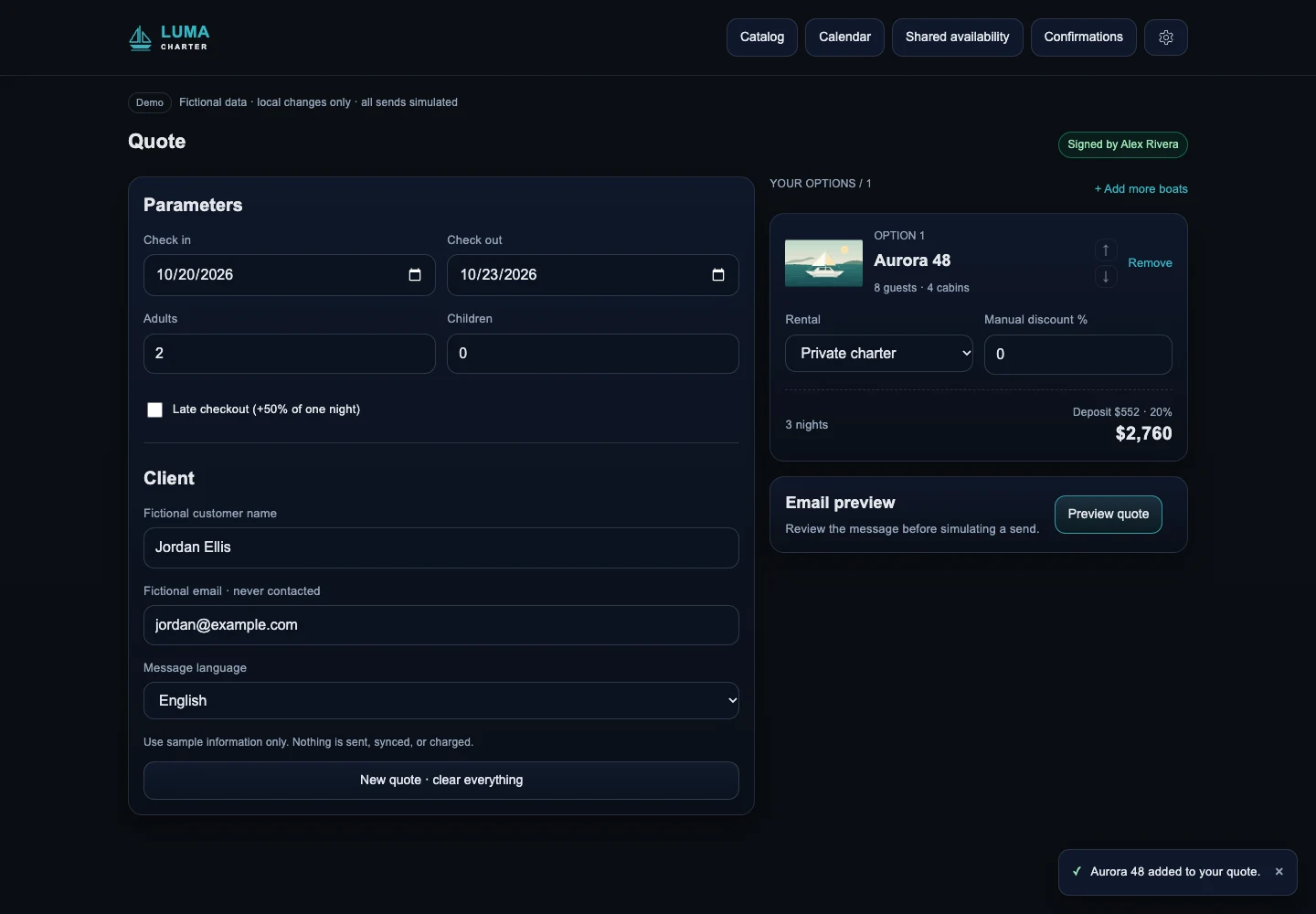
San Blas On Board brought 30+ boats with different owners and rules into one booking workflow, including rule-based quotations, calendar coordination and guest check-in. According to the project owner, quotes that took 15 to 30 minutes now take under five. That is an owner-reported result, not a promise for another operation.
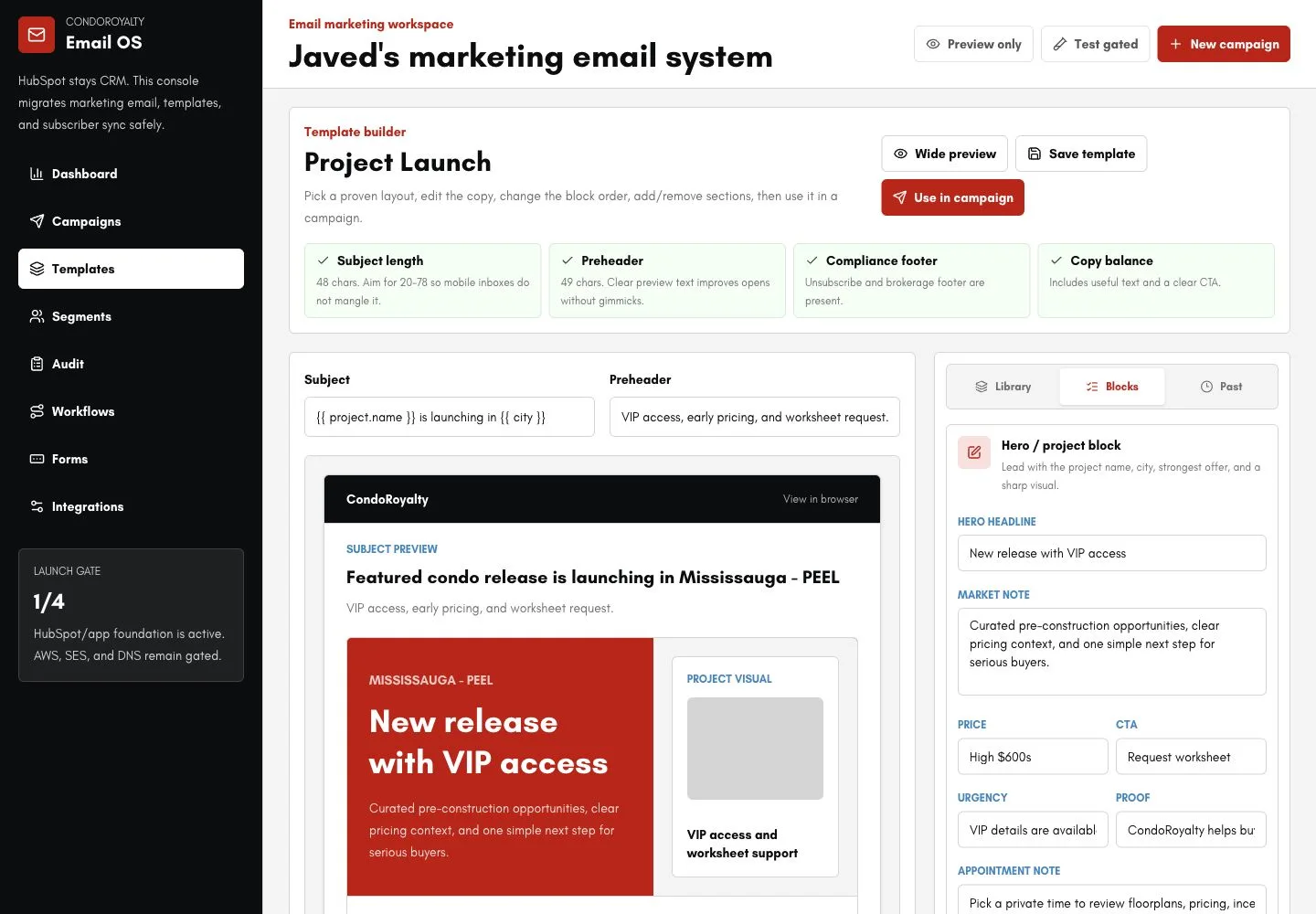
CondoRoyalty Email is a custom platform built after its owner reported an expensive email tool and campaigns landing in spam. It synchronizes HubSpot contacts and sends through Amazon SES with gradual sending, suppression rules and campaign safeguards, alongside templates, scheduling and reporting. The owner reports better delivery; that result has not been independently audited.
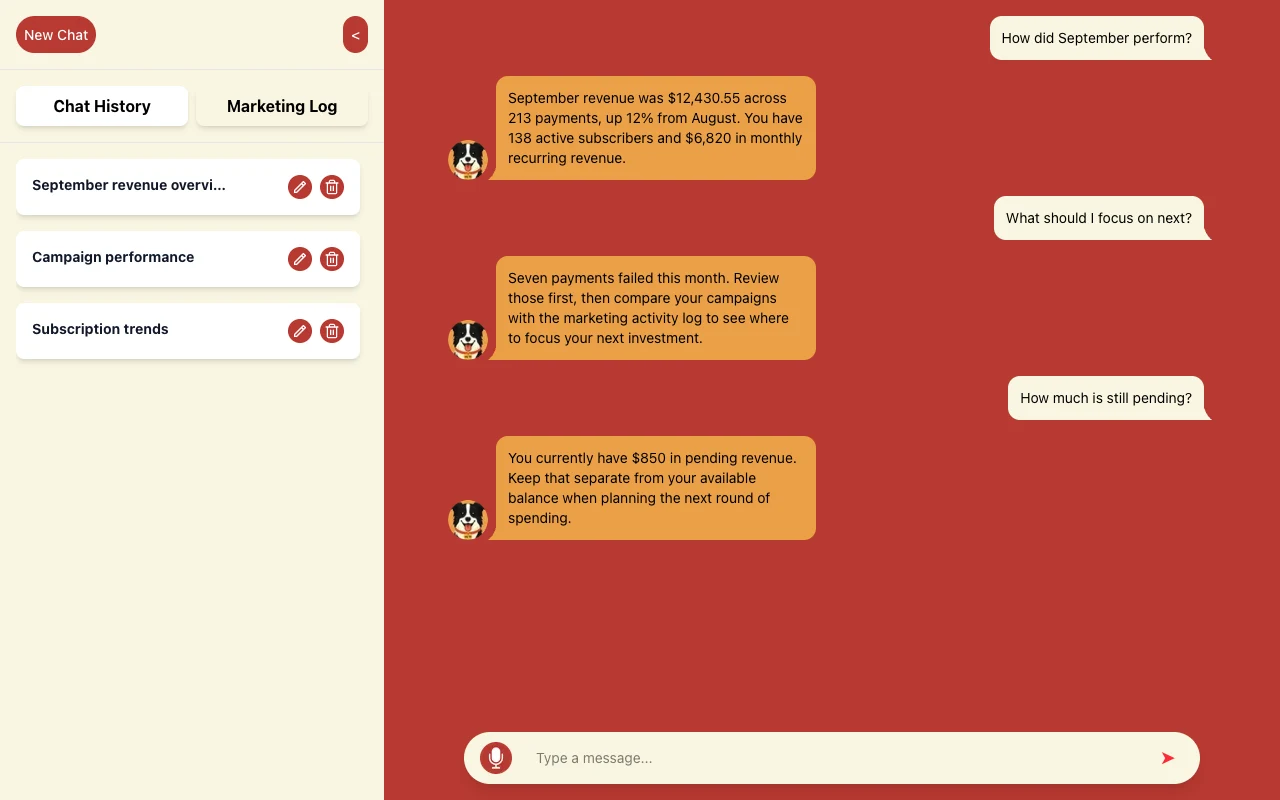
Gold Wrench connects a customer's address to Google Calendar availability, favoring slots near jobs already booked that day, or offering the afternoon or another day. For a different use case, we built WLTR.AI, where people ask questions about revenue, subscriptions and marketing activity through a chat.
Connect your tools without losing track of data
An app can look correct while its CRM, calendar and payment records disagree. Assign a source of truth for each field: the payment provider confirms payment, while your application may own job status. Write down how cancellations and corrections travel between systems.
- 1. One source of truth per fieldDecide which system owns price, stock, status and contact data before writing code.
- 2. Webhooks plus a nightly checkChanges move in real time; a scheduled reconcile catches anything a webhook missed.
- 3. Idempotency keysThe same event processed twice still creates one order, one charge, one email.
- 4. Retries with backoffRate limits and timeouts retry later; events that keep failing go to a review queue.
- 5. Logs and alertsYou can see what synced, when, and why something did not.
A payment success screen is not payment confirmation
Stripe's webhook documentation covers signed payment notifications and duplicate delivery. We use verified events and recorded processing status so a repeated notification does not fulfill an order again. Stripe's idempotency guidance explains keys for safely retrying supported API requests.
Plan retries with increasing delays, a reconciliation check against the source and a review queue for unresolved failures. Staff need to see whether an update is pending, complete or needs help. Our API integration services cover connections when your existing tools can remain in place.
↑ Back to topProven tools, with your accounts under your control
For custom web application development, our typical stack pairs Next.js and React for the browser interface with PostgreSQL through Supabase for stored records, plus Stripe when payments are needed. These tools have distinct jobs. We favor conventional tools that another developer can understand and maintain later.
Customer separation belongs in the database too
Supabase supports database-level access rules called row level security, or RLS. We configure and test rules per customer or organization, so access is enforced beyond the visible screen; see Supabase's RLS documentation. Database permissions, privileged server access and application checks also need review.
Do: keep the business in control
- Use your repository, hosting and database accounts.
- Keep secrets on the server and restrict staff access.
- Document deployment, exports and recovery.
- Test permissions and important business rules.
Don't: accept avoidable dependence
- Leave the only administrator account with a supplier.
- Treat a hidden button as an access restriction.
- Accept data you cannot export or restore.
- Add AI where a clear rule solves the task.
The source code, accounts and documentation belong to you. That reduces supplier lock-in, although moving away from a hosting or database service still takes planning. AI is optional: quoting, permissions and payment calculations usually need explicit rules, while an AI feature needs its own review and usage budget.
↑ Back to topCustom web app development, from scope to handover
We organize the first release around a complete working journey, such as request, quote, payment and confirmation. The clickable prototype settles layout and flow; it does not establish security or prove the integrations work. Those need implementation and tests with realistic exceptions.
- ScopeCore user, core job, what is out. Written acceptance tests.
- Clickable prototypeScreens tested with real users before the backend exists.
- Core buildAccounts, data model, permissions, payments, the one workflow that matters.
- PilotA few real customers, error tracking on, weekly fixes.
- Launch and iterateOpen signups, watch usage and costs, build the next feature from data.
- Step 1
Discover the actual workflow
Walk through a recent job with the people doing the work. Collect roles, sample records, exceptions, existing tools and a clear definition of a successful result.
- Step 2
Agree the written scope and fixed quote
List included workflows, exclusions, integrations, acceptance checks and responsibilities. Agree the scope before work and card payment through Stripe; review changes in writing.
- Step 3
Review a clickable prototype
Let staff and customer representatives try the proposed screens. Resolve confusing decisions and missing information before connecting the interface to live business records.
- Step 4
Build in milestones in your accounts
Deliver reviewable parts through your repository and service accounts. Check access boundaries, calculations, duplicate submissions and failure handling alongside the visible workflow.
- Step 5
Pilot with real users
Try representative jobs with a limited group and controlled data access. Review mistakes, missing steps and reconciliation results before opening the application to everyone.
- Step 6
Launch with backups and monitoring
Prepare data migration, a recovery route, agreed alerts and a rollback plan. Assign an owner for failed jobs and support questions before people depend on the application.
- Step 7
Hand over the application
Deliver source code, account access and operating documentation. Explain routine tasks, recovery and remaining limitations so your team or another developer can take over.
Budget for the build and the working life
Every project gets a fixed written quote before work starts. Roles, workflows, integrations, data cleanup, offline requirements and testing shape that scope. We separate the initial build from subscriptions, usage and ongoing care so you can judge the full commitment.
Ask for a running-cost breakdown
- Hosting, database and file storageEstimate the records, uploads and traffic you expect, with an owner for billing and usage alerts.
- Connected servicesInclude email, maps, payments and any subscriptions needed by the agreed workflow; check current provider pricing.
- AI usage, if includedSet allowed tasks, usage caps and review needs before turning an AI feature on for everyone.
- Maintenance and your team's timeAssign updates, access reviews, restores and failed-job handling, alongside staff training and process ownership.
Our automation cost guide explains these layers in more detail. Agree what routine support covers and how later features are quoted. Avoid a launch budget that leaves nobody responsible for keeping the application useful.
↑ Back to topChoose a builder who can explain the exceptions
Hiring a web app developer for small business
Ask to see a relevant working example and ask what the builder personally delivered. Then describe an awkward situation: a customer double-clicks payment, a crew loses signal, or a manager leaves the company. A useful answer explains what happens to the records and who can intervene.
Fer Marketing is operated by Fer LLC in Wyoming and led by Fernando Marcano, an IT engineer with 20+ years of hands-on IT experience. Our homepage shows 100+ Upwork projects with 100% Job Success. We work with the US market in English and Spanish.
What your business does and who will use the app
The process that is slow or unreliable today
Tools, records and exceptions involved
Who approves the work and owns daily operation
Any existing app, deadline or offline requirement
Send the brief through our contact form, WhatsApp or phone. We reply the same business day, from 9 AM to 9 PM ET. After scope is agreed, payment is by card through Stripe.
↑ Back to topWe can build this for you
Want us to build your business web application?
Show us the workflow and the tools involved. We will agree on a fixed written quote before any work starts.
- Written scope, acceptance checks and clickable prototype
- Agreed workflows, roles and integrations built in milestones
- Critical-path checks, pilot and launch preparation
- Your source code, service accounts and operating documentation
- Handover covering backups, monitoring and daily tasks
Frequently asked questions
What is custom web app development?
It is building browser-based software around your business processes, roles and data. Examples include a customer portal, quoting system or internal operations tool connected to the services you already use.
When should I use a subscription instead of custom business software?
Use an existing service when it covers almost everything and its access, export and integration options fit. Custom work makes sense when important operating rules or connections cannot be handled reliably by the available tools.
How much does custom web application development cost?
We provide a fixed written quote before work starts. The scope depends on workflows, roles, integrations, existing data, offline behavior and acceptance checks; hosting, connected services and maintenance are separate running-cost decisions.
What does customer portal development include?
The agreed scope can include customer accounts, documents, order history, payments and support requests. Permissions must separate customers' records, and the portal needs clear rules for changes, cancellations and staff approval.
Can my field crew use the application offline?
Yes, when offline behavior is included in the scope and fits the required devices and browsers. It needs local storage, a visible sync queue, conflict rules and device privacy checks; browser access alone does not provide those features.
Who owns the code and can another developer take over?
You own the source code, accounts and documentation. We build in your repository and hosting and database accounts, with handover information for another developer; moving between service providers can still require migration work.
Can you finish an existing or AI-built web application?
We can assess the existing application before proposing repairs, completion or a rebuild. The review looks at access control, stored data, important workflows and deployment so the quote reflects what can safely be retained.
Can you build internal tools for an agency's client?
Yes. We offer white-label delivery under the agency's brand, with NDA and non-solicitation terms available. We agree on requirements, approvals, account ownership and the support handoff before building.
Contact us for a fixed written quote and a same-business-day reply, 9 AM to 9 PM ET, with white-label delivery available for agencies.